Review of PowerPrint 4.5

Hands-On Review: PowerPrint 4.5
Infowave Imaging, Inc. Price: $99 list, $69 upgrade
October 12, 1998
Pros: Allows a Mac to print with virtually any printer. Easy to set up and use. Print quality may even be higher with PowerPrint. Faster printing in most modes. Works with SoftWindows and Virtual PC.
Cons: Slower printing in Normal mode on one document.
Rating: Outstanding, 5 out of 5 Exclamation Points: ! ! ! ! !
Want to print with a printer that doesn't have a Mac serial port but does have a Wintel parallel port? Worried about the reduction of printers on the market with Mac serial ports? No problem. PowerPrint 4.5 is an excellent solution. The documentation lists over 1500 laser, inkjet, bubblejet and impact printers (black and color) that can be connected to a Mac, including a PowerBook that has both ADB and Serial ports. The minimum requirements are: a 68040 processor or PowerMac, Mac OS 7.5.1 or higher, 8 MB RAM, an ADB port and serial port.
Version 4.5 is an update to version 4.0 reviewed by Macs Only! last July. So what is new? The system requirements are higher. The number of supported printers. There are improved drivers for two of the supported printers, the Lexmark Optra E+ (with support for an optional paper tray) and the Hewlett-Packard DeskJet 890C, one of the top color inkjet printers offered by H-P. The all new driver for the H-P 890C has enhanced driver features like watermarks and N-up printing and Apple's ColorSync. The written manual is improved in clarity and coverage and the packaging is different.
PowerPrint 4.5 supports Apple's PC Compatibility Card and Insignia's SoftWindows according to Infowave's literature. There was no mention of Virtual PC so I briefly tried it myself using VPC v2.1.1. PowerPrint works with Virtual PC. The print was on the light side but since I am no Windows 95 whiz I didn't spend much time trying to figure out how to darken the print.
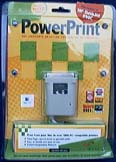
What you get
PowerPrint 4.5 comes in a rigid blister pack that can be hung on a rack or placed on a shelf. The software is provided on a CD ROM. Floppy disks for Macs without a CD ROM drive are available from Infowave. Also included is a powered serial port to parallel port converter cable. A 36-page printed installation guide/manual completes the package.
The CD includes the PowerPrint Installer, 3 Readme files (Installation, 4.5 and DeskJet 890C), Adobe Acrobat Reader v3.01 Installer and the manual in PDF format which can be read by Acrobat Reader. There are also a FileMaker Pro 3 reader and a PowerPrint Technical Information database. Serial DMA 2.02 and 2.1 are included if your Mac needs one or the other.
The printed manual has 8 pages of troubleshooting tips. The technical information database has over 240 technical documents and a search engine. Then, of course, there is customer support on the web and by phone.
Installation and Setup
The manual has only 6+ pages covering installation but that is all that is needed with the good set of illustrations and screen shots. Installation and setup are no-brainers.
First, simply look up your printer in the manual's 12-page listing and note the correct driver. If for some reason, your printer is not among the 1500 listed, visit Infowave's web site for the most recent list. If not there, then pick one for a printer that is similar and try it or an emulation mode that is listed in your printer's manual.
Second, click on the Installer and follow the Custom Install directions, picking the driver that you selected from the manual's list or Infowave's site, and selecting the installation of SpoolMaster (for background printing) and the Technical Data base if wanted on your hard drive.
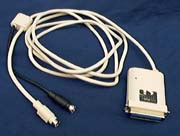
Third, connect the cable. The cable has a parallel port connector at one end and an ABD port and ADB and serial port connectors at the other. Start with your Mac off and unplug the keyboard cable and plug it into the cable's ADB port. Plug the cable's ADB connector into the ADB port where the keyboard's was and the serial connector into the Mac's printer (serial) port. Then plug the cable's parallel connector into the printer's parallel port. The cable draws electricity from the ADB port so no other electrical connection is needed.
Fourth, power on the Mac and the printer and make sure the LED light on the cable's parallel port connector is green.
Fifth, check the manual for printer settings that may be needed for certain printers (my Epson Stylus Color 500 needed nothing else set).
Sixth, make sure the QuickDraw GX extension is not enabled then open the Chooser, select PowerPrint's printer driver icon, the printer port, set background printing "On" if SpoolMaster was installed and close the Chooser.
That's basically it. There are other details, however, if you are connected to a network .
Use
I used PowerPrint 4.5 for a couple of weeks before posting this review to make sure nothing bad would show up with steady use--nothing did. It worked perfectly the entire trial period, printing text documents of all types and graphical images.
One thing that had me stumped for awhile was printing text from a web browser or a browser's email application, i.e. Netscape Messenger or Microsoft Outlook Express. The window's contents didn't print out, just a date header and a page number footer surrounding an otherwise blank page. Infowave's technical support provided the answer right away. I needed to change the "Color" option selection from "Black & White" to "Grayscale" or one of the color settings since the browser/mailer output is graphical rather than plain text.
My test setup was as follows:
PowerComputing PowerBase 180
- 603e 180 MHz with 512K L2 cache
- 32 MB RAM
- Built-in ATi Rage II video, 2 MB VRAM
Printer
- Epson Stylus Color 500 inkjet
Before testing PowerPrint 4.5, the PowerBase 180 and a PowerMac 9600 were both attached to the same Epson printer through a serial switch box to the Mac serial port on the printer. This required manually flipping the switch to the correct computer. Installing PowerPrint on one of the Macs allowed both Macs to be simultaneously attached to the printer since the Epson has both a Mac serial port and a PC parallel port. Of course, only one computer could print at a time but it saved flipping the switch which is easy to forget and forgetting causes one to have to reset the printer and sometimes the computer.
Speed: The first thing that I noticed with version 4.0 of PowerPrint was that the time between clicking on the "print" button and the printer beginning to print seemed to be substantially less than using the printer's serial port with Epson's driver. The same is true for version 4.5. It generally takes 15 seconds before printing begins with the Epson driver/serial cable but only 8-10 seconds with PowerPrint. I created a SimpleText document to check the quality of the printed page with PowerPrint against the Epson driver/serial cable. The content of the document consisted simply of the keyboard letter keys in 9-point and 24-point and plain and bold text. The second document was the first page of the PowerPrint 4.5 Readme file. Both documents were printed using the "Normal" (this setting is called "Best" by the Epson driver) and "Best" (this setting is called "Super" by the Epson driver) settings. The time to print each document, counting from clicking the Print button to the printer ejecting the printed page, for the regular Epson driver via the printers serial port and for PowerPrint via the parallel port are as follows:
PowerBase 180 -- Time to Complete Printing Document (Minutes:Seconds)
| Printer Port/Resolution | Keyboard Letters | ReadMe File (1st page) |
|
Epson Serial/Best
|
0:33 | 0:46 |
|
PowerPrint/Normal
|
0:32 | 2:09 |
|
Epson Serial/Super
|
0:65 | 5:52 |
|
PowerPrint/Best
|
0:58 | 5:41 |
I repeated each print job to see if the times were consistent and they were. The PowerPrint driver was quicker to start printing, taking only 8-10 seconds, while the Epson driver took a constant 15 seconds. Except for one glaring case, the PowerPrint driver via the parallel port was marginally faster than the Epson driver over the Mac serial port. The full page Readme file with a mixture of bold headings and regular text inexplicably took over twice as long to print out with PowerPrint. Except for that, I would rate them both even.
Quality: Careful examination of the printed documents revealed that PowerPrint via the printer's parallel port produced sharper, more complete and darker printed type that did the Epson driver via the printer's serial port. This was true for each test document at each print speed setting and may at least partially explain the anomally above. I do not know, however, if the quality improvement results from the PowerPrint's driver or the Epson printer's better handling of parallel port input or both. Nor do I know if this advantage would occur in other printers.
Conclusions
PowerPrint 4.5 allows most any Mac/clone to print with most any printer on the market. The main Mac exception is the iMac with a USB serial port instead of a Mac serial port. [Note: Infowave has announced a USB/parallel cable for the iMac.] The main printer exceptions are some of the more inexpensive laser printers. PowerPrint is easy to install and use. It works with Apple's DOS card, SoftWindows and Virtual PC. In the limited tests that I performed, PowerPrint printed as fast as printing with the Epson drivers over the Mac serial cable to the printer's serial port with one significant and unexplainable exception. The print quality from PowerPrint was as good or better than from the Epson driver/Mac serial port. PowerPrint 4.5 is an excellent upgrade of an already outstanding product. I could not find many major faults with it, just the one slow printing case, so I've rated it a 5 out of 5 exclamation points. The price at $99 may seem high relative to Epson's $40 and Hewlett-Packard's $70 USB/parallel port cables. The Epson and H-P cables only support the iMac and a few printers so the margin is worth the many more printers that PowerPrint supports. Owners of previous versions can upgrade for $69.
PowerPrint works with one Mac and one printer. Infowave also produces PowerPrint Pro which allows multiple Macs to use one printer over a network. Yes, using PowerPrint will cost you more money to use a printer with no Mac serial port. However, this is Apple's fault, of course, and not PowerPrint's. In the future, Apple may no longer produce Macs with a Mac serial port. Apple has committed to the Universal Serial Bus (USB) port which will also be the predominant port on PCs. However, there are 20 million Macs in use and none (other than the iMac) have a USB port. PowerPrint provides lots of printing options for those Macs in the time being.
Copyright © 1998 by Bill Fox
All rights reserved--no commercial use permitted without attribution.
Of course . . . . . . and I am proud to be an Evangelista! . . .
Saw something? Send a tip or a correction
The archive ran on reader tips. What did you see, where, and do you want the credit? Something wrong on this page? Say so and it gets fixed.