Review of Funnel Web 2.5

Hands-On Review: Funnel Web Pro 2.5
Active Concepts, Ltd.. Price: $499 ($249 standard version), Free upgrade from v1.x and v2.x
November 11, 1998
Pros: Easy installation and setup, vast number of summary statistics and great graphs, high server log compatibility, easy processing of multiple files, very fast, excellent documentation.
Cons: None
Rating: Outstanding, 5 out of 5 Exclamation Points: ! ! ! ! !
Funnel Web provides summary statistics and graphs of the traffic at web sites from log files produced by the web server. I have used Funnel Web to analyze the log files of Macs Only! nearly since Funnel Web was first introduced in the summer of 1997. Active Concepts, Inc. provided an evaluation copy of v1.04 in the fall of 1997 which I reviewed favorably and v1.7.1 which I reviewed very favorably last Spring. Funnel Web v1.7.1 added a professional ("Pro") version to the standard version. The principal features of the Pro version are: real-time updating of log analyses, handling high load (millions of hits per log), multi-home and multi-domain reports. Active Concepts released a major upgrade to v2.0 at Macworld Expo '98 and an updater to v2.5 last week. Active Concepts provided the updated Pro version (2.5) for this review.
What is New in v2.0->2.5?
The main new features in v2.5 are:
Mean Path Analysis -- The mean path feature is an easy way to obtain a rapid visual snapshot of the most followed traffic pattern.
Offsite Processing -- With this feature, companies whose site is remotely hosted can schedule Funnel Web to logon by FTP to the remote server, download the log file, process it and send the report to the server. Funnel Web is the only site analysis application that supports offsite processing on the Mac.
Regional Reporting -- This feature displays the number of hits by seven geographic regions: Antarctica, Africa, Asia, Europe, South America, North America and Oceania and supports reports in 12 languages. A number of aliases of a Web site can be combined to produce one report.
Supports More Servers and Image Formats -- The memory requirements have decreased up to 40% for large log files. Support has been added for JPEG, PNG and BMP graphics, comma-delimited and RTF export, and Robot exclusion through filtering on agents. Support has also been extended for FileMaker and added for DoorStop, AppleShare IP and several new routers. Funnel Web supports 72 different Web servers, including WebSTAR, IIS, WebSite, and all Netscape Servers.
The improvements by version step from the ReadMe file are:
Version 2.5 (4 November, 1998)
• Added offsite reporting feature
• Added directory specification to FTP upload feature
• Decreased memory requirements by 40% on larger log files
• Added new image file formats, BMP, JPEG and PNG
• Added new regional reporting
• Added mean path through site
• Support for Microsoft's "Index Server" queries
• Added user reports
• Added drop shadows to graphs
• Tweaked performance by another 20%
• Improved memory stability on all systems
• Added multitasking option to share more system resources for busy servers
• Fixed problem in processing Personal Web Sharing logs from Apple
• Added ability to interpret user name information from Common Log formats
• Fixed problem in processing FileMaker Pro extended log formats
• Added .fcgi and .lasso to list of pages recognized internally
• Fixed Date format recognition for logs created using the Swiss date format YYYY-MM-DD
• Improved the recognition of IIS logs vs IIS proxy logs
• Improved DNS cache speed by a factor of 100, particularly important on large cache files with over 10,000 entries.
• Improved memory management in DNS cache
Version 2.0.3 (10 September, 1998)
Version 2.0.2 (26 August, 1998)
• Added ability to hide the floating palette from the new Window menu
• Added new virtual reporting feature based upon the top level directory for older simulated virtual domains
• Now copies across client and path filters from version 1.7 settings files into version 2.0 format
• Added new last 30 days report
• Added MacOS 8.5 compliance for settings dialog which would not recognize scroll bars
• added downloads to session click stream history
Version 2.0.1 (6 August, 1998)
• Added the ability to cancel processing during graph creation
• Added new Error charting on main reports (Red line) and changed the colour of the moving average to Yellow
• Added support for FileMaker Pro Extended log files
• Added new date/time specifications for log rolling and scheduling features
• Added progress dialog while sending email messages
There are also a number of minor bug fixes.
Installation and Setup
Funnel Web's installation procedure is easy, just a single double-click on the installer. Nine items are installed in a folder on the selected hard drive--the Funnel Web application, a Manual folder, a Language folder, a Logs folder, a Reports folder, an AppleScript folder, ReadMe file, Internet Config 1.4 and the Solo Bug application. The Language folder contains .lang files for obtaining reports in many languages. The Logs and Reports folders contain a sample log file and a set of sample reports. The AppleScript folder contains a script for scheduling the running of Funnel Web. Solo Bug is for easily reporting any bugs or problems that one may have with the application, an exceptional feature.

The Funnel Web Pro v2.5 floating window shown above (the standard edition is identical except for a red cast rather than blue) is unchanged from v1.7.1. It has five buttons to activate its principal functions. The functions are also available from the File and Edit menus on the menubar. Funnel Web is configured or set up through the Settings and Schedule buttons. The Open button is used to select the files to be processed and the Process button is self-descriptive. The View button opens your web browser to view the summary statistics and graphs.
Pressing the settings button pops up the window shown below. It is changed from v 1.7.1.
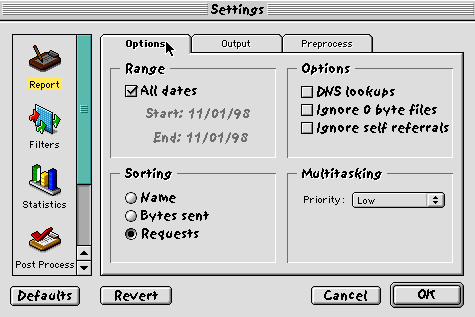
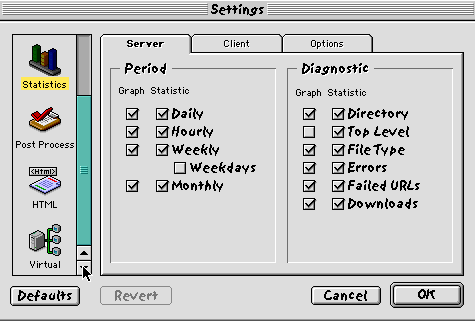
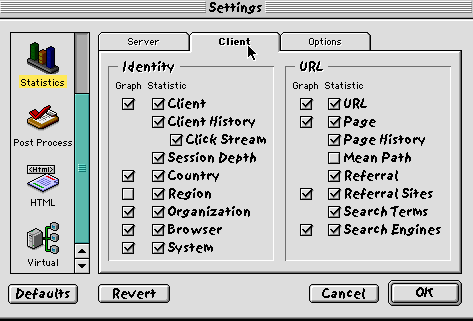
There are more options and settings so they are organized in three tabs. Two of the Statistics tabs are shown below. There were 19 summaries in v1.7.1 but there are 10 Server and 16 Client statistical summaries in v2.5 plus summaries for individual weekdays.
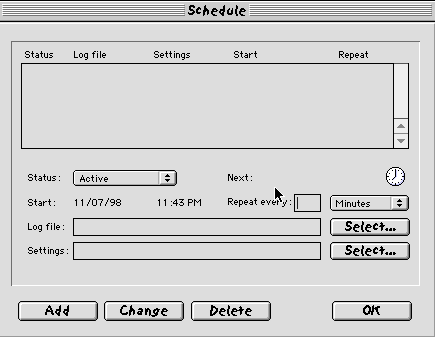
Funnel Web v2.5 can be scheduled to automatically access a web server and download log files for processing via the Schedule button on the floating window. The Schedule panel is shown below.
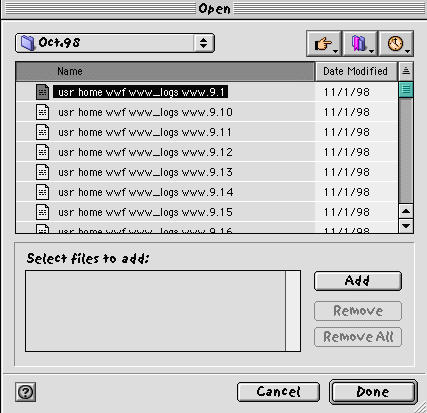
Multiple Log files are selected for processing using the Open button on the floating window. The Open window is shown below.
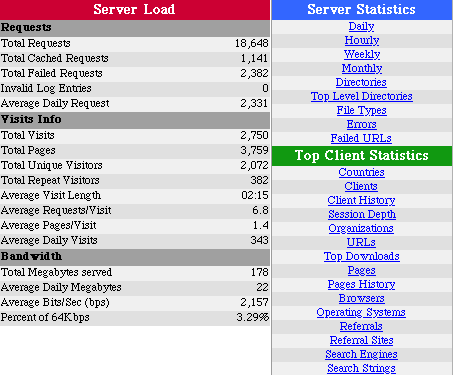
The incredible list of summary statistics for Server Load, Server Statistics and Client Statistics provided by Funnel Web v2.5 are shown below. Each of the Server and Client statistic summaries is graphed and compiled in an ordered table.
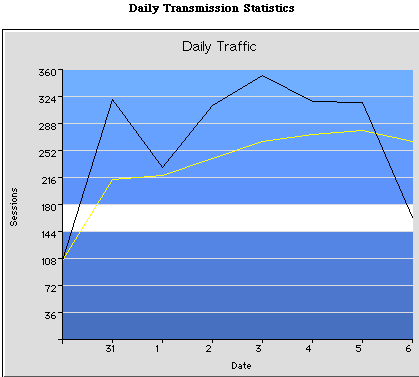
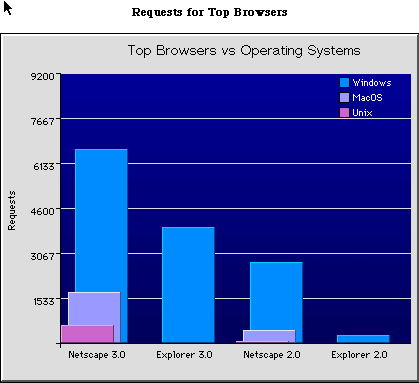
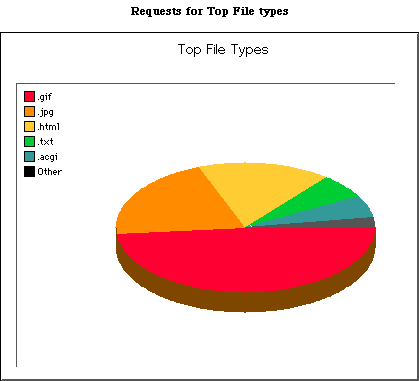
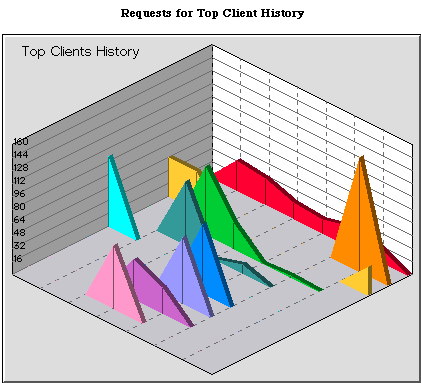
The summary statistics are presented as bar, line, perspective or pie graphs as shown below. The graphs are much improved visually over those offered in v1.7.1.
Use
Funnel Web Pro v2.5 is a delight to use. Any number of log files may be selected, i. e. monthly, weekly, Sundays, quarterly, annually -- it doesn't matter, Funnel Web summarizes and graphs their data. Processing my web site log files is a breeze and fast. On test log files, Funnel Web Pro 2.5 processed over 770K records in 3 minutes 49 seconds and created the graphs in another 30 seconds, faster overall than Funnel Web Pro v 1.7.1.
The manual was a DocMaker file in previous versions but is an HTML file set in Funnel Web v2.5. The 22-file manual can be read with any web browser. It is comprehensive, easy to read, easy to follow and full of illustrative screen shots.
Conclusions
Funnel Web has come a very long way since it's introduction over a year ago last Summer. The new Pro version has a number of features that I did not cover and that will appeal to corporate clients, such as the ability to summarize internet usage by staff members. The ease of installation, configuration and use is excellent. The number of data summaries, graphs, appearance, and speed is outstanding. It appears stable as I've not had one crash while using version v2.5. The documentation is super. I could find absolutely nothing wrong with version 2.5 nor other features or changes to recommend. Active Concepts has continued to improve an already outstanding product.
Copyright © 1998 by Bill Fox
All rights reserved--no commercial use permitted without attribution.
Of course . . . . . . and I am proud to be an Evangelista! . . .
Saw something? Send a tip or a correction
The archive ran on reader tips. What did you see, where, and do you want the credit? Something wrong on this page? Say so and it gets fixed.