Review of iPort for iMac

Hands-On Review: iPort
Griffin Technology, Inc. Price: $70 list
December 3, 1998 (rev.2, first posted 11/27/98 11:50p)
Pros: Great solution for external video and serial devices, personal installation possible, seamless to use, inexpensive.
Cons: Lack of LocalTalk/modem/ISDN capability in beta version, video mirroring only, manual still coming.
Rating: Excellent, 4 out of 5 Exclamation Points: ! ! ! ! for now and expected to rise for the final unit.
Earlier this year Apple Computer produced the iMac, the most outstanding consumer computer "for the rest of us" since the original Macintosh was introduced in 1984. The iMac was designed on the original Macintosh theme of elegant simplicity, excellent design, innovation and highest quality plus the latest Apple theme of unsurpassed speed and value. 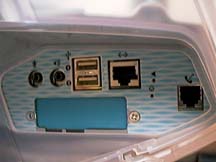 Of course, the iMac is not without criticism. One innovative feature that has been criticized is Apple's abandonment of its serial and ADB ports for the faster, more versatile and multiplatform Universal Serial Bus (USB) port. And one simplicity feature that has been criticized is the lack of a video port for attaching larger monitors than the excellent 15" built-in monitor. The lack of these two features have other purposes, of course, one to minimize the market price and the other to be as simple as possible for the entry-level consumer. Inexpensive expandability is for the low end of the PowerMac "pro" product, not the iMac according to Apple. But the iMac is such a hit that everybody wants one, not only entry-level consumers but enterprise and graphics professionals as well. Fortunately for them, Apple blinked and left an opening covered by a blue plate on the iMac's port plate in its port compartment shown in the photo above at left.
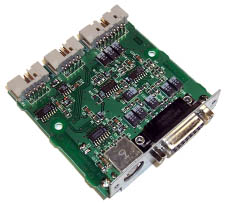 Griffin Technology moved quickly to meet this need and produced the iPort. It has an Apple DB-15 video port for a larger monitor and an Apple serial port for serial devices like printers, modems and digital cameras. The iPort is shown in the photo at right. Griffin Technology provided a near final preproduction unit for this review.
What You Get
The iPort is in final production by Griffin as you read this review. The commercial version will differ somewhat from the evaluation unit that I received so I won't dwell on it, its packaging or its documentation. What came in a plain box was the iPort with two ribbon cables, one is double ended, and an instruction sheet. The iPort Control panel at v0. 4 was downloaded from Griffin's web site. Griffin plans to have an installation and use manual plus the design for the motherboard standoff will be changed. I will revise this section of the review to be consistent with the final product when it becomes available in the very near future. However, if you need the iPort there's no reason to wait to order it. Demand will be high.
Installation and Setup
Griffin Technology recommends using an Apple Authorized Service Center to install the iPort. This is to minimize the likelihood of accidentally doing some damage to the iMac during installation. Such damage will not be covered by Apple's warranty. Of course, this is true of anything one adds to the inside any Mac, including RAM and PCI cards. Simply installing the iPort does not void your Apple warranty according to Griffin. The iPort is installed where the blue plate cover is on the iMac's port plate as shown in the photo above to the left.
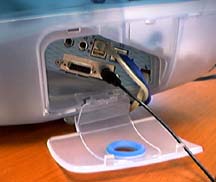 The iMac has to be opened, the motherboard tray removed and the motherboard itself partially removed to install the iPort. It is relatively easy to do but there are more than a few steps. Here is Macs Only!'s exclusive Hands-On: 10-Step iPort Installation Guide that includes photographs of each step. It took me just under an hour to complete but I had no illustrated guide, had to go easy in removing the motherboard which I had not done before and take several pictures of each step, confirming that each photo was okay before proceeding. I think that installation could be done by a reasonably handy person in less than half an hour with the guide. The installed iPort is shown in the photo at left with its video and serial ports among the other iMac ports in the port compartment. The black cable is an Apple QuickTake 200 digital camera cable plugged into the iPort's serial port with the video port at its left. Also filled are one USB port for the keyboard, the 10/100base-T ethernet port (blue cable) and the modem port (beige cable).
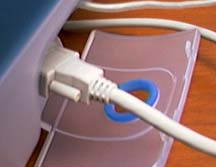 My main publication layout and presentation development (read PowerPoint) efforts are conducted normally with a 21" RasterOps monitor attached to a PowerMac 8500 driven by a PowerLogix PowerBoost Pro 225 604e CPU upgrade card and built-in video with 4 MB VRAM. The monitor is a multiscan monitor with a DB-15 PC connector so I have to use an adapter to attach it to the Apple DB-15 video port on the Mac. How well does it fit on the iPort? At right is a photo of the adapter and monitor cable attached to the iPort on my iMac. Unfortunately, the adapter causes the monitor's cable connector to protrude far enough from the port compartment so that the door can't be closed even if the cable is bent around to go under the door like the other cables do. However, without the adapter it looks possible to curve the cable enough to get it out under the door and to close it. I need a longer monitor cable anyway so will order one with Apple connectors, attach the adapter to the monitor end of it and revise the review with the results. One of the best things about the iMac is that it tames the cable snakes better than any other computer.
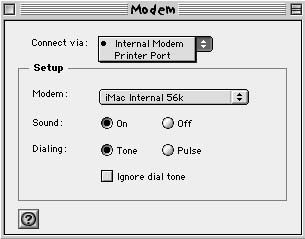
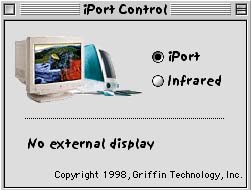 The software is the iPort Control panel shown in the photo at left in beta testing version 0.4. The control panel is placed in the control panel folder in the system folder and it provides three features. It shows whether an external monitor is connected. It has two radio buttons for selecting between using the iPort's serial port and the iMac's infrared port. Also, it enables a Printer Port selection in the "Connect via" popup window in the modem control panel. See below at right. Without it, the "Connect via" popup menu on the modem control panel is not enabled and only reads "Internal Modem". The iPort Control panel is expected to be ready when the iPort ships. However, it is not needed to connect and use an external monitor with the iMac.
Use
Serial Port: The first thing I tested was the serial port. I plugged in my Apple QuickTake 200 digital camera used to take the photos for this review, turned it on and opened the Camera Access application. Up it came showing all of the photo thumbnails on the first SmartMedia card. The images opened fine and could be edited with Adobe PhotoDeluxe. It worked perfectly and no special driver was needed.
Since the iPort software is still under development, I had less luck with an attached SupraFAXmodem 288. I set up Remote Access, Modem (choosing the Printer Port and the Supra modem script) and TCP/IP to dial my internet service provider using the Supra instead of the iMac's internal modem. Clicking "Connect" resulted in an error message involving "...using Open Transport resources." After several failed attempts to ensure it was not a problem with my iMac, I reset the Modem control panel to the Internal Modem and iMac Internal 56K modem script. This resulted in a first time connection at 46K. My LocalTalk laser printer attached to iPort's serial port suffered a similar fate. This, of course, is not unexpected for beta software. Connecting a modem to the serial port is important as a backup if the internal modem craps out and for those using ISDN through a terminal adapter with an Apple serial port but no USB port.
Finally, I installed the Hewlett-Packard driver for a HP 870c serial inkjet printer, hooked up the HP 870c and turned it on. It printed perfectly first time every time. Again, no special driver was needed. Griffin Technology has a page that lists compatible printers right here.
Video Port: The video port is the principal reason for my own interest in the iPort. If it works well, I can pass the 8500 on to another person and just use the iMac.
I connected the RasterOps MC21 21" monitor to the iPort video port and hit the start button. The MC21 came on first (gray screen) after 23 seconds and 20 seconds later the iMac monitor came on, i.e. just about the time that the extension icons began marching across the screen. A restart (and for subsequent startups) resulted in the external monitor coming on after 23 seconds and the iMac internal monitor only 5 seconds later at the Happy Mac icon.
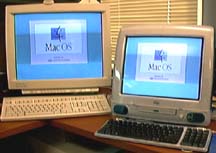 The video signal was excellent. Video mirroring between the two monitors worked at 640x480@117Hz, 800x600@95Hz and 1024x768@85Hz as it should. Mirroring works at all three of the iMac internal monitor's resolutions. The MC21 worked very well at a myriad of resolutions from 512x384@70Hz to 1600x1200@65Hz. The iMac monitor was blank at all except the three resolutions noted since it does not support the other resolutions. The internal and external monitors can not be set independently. Therefore, the external monitor can not be used as an extended desktop or vice versa. Hopefully, this capability can be added for those that need it. Still, the iPort works very well as reflected in the happy Mac OS logos at left! Their smile reflects my personal opinion as well. I can work on a large monitor when I need to and I can provide demonstrations to others on the larger monitor.
Conclusions
The iPort is excellent! It is too soon to draw final conclusions about the iPort but even at this point having only used a near-final preproduction unit with a beta control panel, the iPort is a clear winner. With it I can now do everything I need to do on my iMac. I can pass my cherished 8500 along to another person. The external video works perfectly so that I can use my 21" monitor up to a resolution of 1600x1200@65Hz and video mirroring allows showing demonstrations to others on a large external monitor while I work on the iMac's internal monitor. My only suggestion is to add, if possible, the capabilty to operate each monitor independently. The serial port works great with my digital camera and a Hewlett-Packard 870c inkjet printer with an Apple serial port. Only the modem/LocalTalk functionality and a manual remain to be completed. According to my sources, the iPort is in final production and should be shipping in quantities during the next couple of weeks. If you need external video from your iMac or have serial devices for other Macs that you want to use on your iMac, I highly recommend the inexpensive $70 iPort from Griffin Technology.
Copyright © 1998 by Bill Fox
All rights reserved--no commercial use permitted without attribution.
Of course . . . . . . and I am proud to be an Evangelista! . . .
Saw something? Send a tip or a correction
The archive ran on reader tips. What did you see, where, and do you want the credit? Something wrong on this page? Say so and it gets fixed.