Follow Up--Installing Mac OS 9.2.1 on Unsupported Macs
The 8500 has a (now) paltry 80 MB RAM and a PowerLogix 250 MHz 604e CPU upgrade board. Every time we use the 8500 we are reminded that even though it is over 5 years old, it is still as good as the latest Power Mac G4 for most routine tasks. It runs great on Mac OS 9.0.4, solid as a rock, but is a bit unstable with Mac OS 9.1--we are not sure why.
It took both procedures for us to get a bootable installation. First, we tried just the second procedure, i.e. in the installer deleting the "IncompatHW" file and renaming a duplicate "Welcome" file to "IncompatHW" plus keeping a copy of the Mac OS 9.1 System file. Mac OS 9.2.1 Updater wouldn't install giving an error message. Then we changed Gestalt ID from 69 for the 8500 to 510 for a Beige G3, the Mac OS 9.2.1 installer ran fine, we replaced the System file with our 9.1 System file and rebooted. Here is the "About this Computer" window:
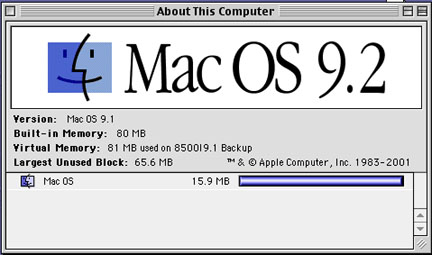
A hybrid system was created. The Startup splash screen said 9.1 but ATC said Mac OS 9.2 with the version as 9.1 (see above). However it booted okay and both Netscape 4.7.8 and Word 2001 seem to run fine. But Internet Explorer quit on launch and PowerPoint 2001 caused a freeze on launch, every time.
Then we tried just changing the Gestalt ID. Mac OS 9.2.1 installed over 9.1 but on rebooting we got a system error dialog box saying that the system would not work on the 8500. When we replaced the 9.2.1 System file with our 9.1 System file, it booted and behaved badly as before. We are now faced with a clean install of Mac OS 9.0.4.
We are tempted to try our Power Mac 7300 or Power Book 2400c, both upgraded with G3 CPUs but Accelerate Your Mac!'s web page in now filled with other unsuccessful attempts. It's looking like Mac OS 9.1 may be the end of the line for pre-G3 Macs, especially if Mac OS X 10.1 will require Mac OS 9.2.1 for Classic mode.
Saw something? Send a tip or a correction
The archive ran on reader tips. What did you see, where, and do you want the credit? Something wrong on this page? Say so and it gets fixed.