Hands-On Report--Cool Your Cube Inexpensively
On the weekend we pieced together an inexpensive external fan and compared it with the MIC. One could install an internal fan as was done on this web page that we noted last week but doing so requires the Cube to be completely disassembled. Since it doesn't look too difficult, we plan to install an internal fan eventually but others may not be comfortable doing so.
We bought an 80x80x20 mm Panasonic Panaflo 2000 rpm fan from Digi-Key (part number P9732-ND) for $12.50 plus S&H. It is a relatively quiet fan with ball bearings, the same fan installed internally on this web site. We also bought four 2" 6x32 flathead bolts, four nuts, four washers and four lock nuts, all stainless steel, for about $4 from Home Depot. Finally, we bought a 12 volt AC/DC adapter and connector from Radio Shack for about $15. Tax and shipping brought the total to just over $40. We also re-used the Radio Shack rheostat used in the MIC but in the end it wasn't needed.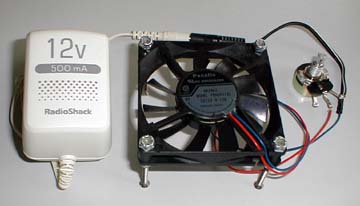
The 2" bolts with a nut, washer and lock nut were assembled into four legs on the fan. The connector and rheostat were soldered onto the fan's wires. The connector then plugs into the AC/DC adapter. See the results in the image at right. It's not very pretty but it works. Actually, a small power switch should be soldered into the place where the rheostat is at right in the image.
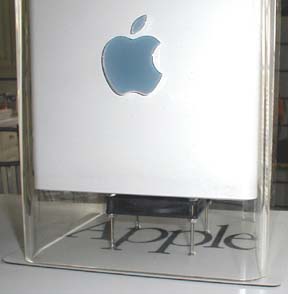 The fan is placed under the Cube and the AC/DC adapter is plugged into an AC outlet. When placed upright under the Cube, the fan leaves about a half inch clearance. It is not that visible from a standing or seated position unless on gets down level with it as in the image at left. We found that it works best when placed as far back against the cables coming from the Cube's ports as possible thereby further reducing its visibility. One could also encase the fan assembly in a 4" aluminum or plastic tube painted whatever color one desires. We're leaving it alone because it is not too noticeable.
So, how well does it work? We repeated the same temperature measurements that we did for the Monroe Ice Cube review. We set Quake III Arena on the "award" image and measured the temperature in the middle of the Cube's center and rear vents after an hour. We also recorded the CPU junction temperature displayed by Jeremy Kezer's Thermograph v1.34. Results with the fan at full speed and at half speed (slowed) are shown below as "Fan" and "Fan (slowed):
| Center Vent | Rear Vent | Thermograph | |
|---|---|---|---|
| Stock Cube |
118
|
135
|
131
|
| MIC |
104
|
126
|
109
|
| MIC (slowed) |
111
|
130
|
123
|
| Fan |
99
|
122
|
109
|
| Fan (slowed) |
101
|
130
|
117
|
The inexpensive single fan apparently cools much better than the MIC. It is also much quieter. The fan emits a perceptible whir at full speed in a quiet room but it is not noticeable with any other background noise such as our external FireWire drive. There is no need to reduce the fan's speed so the rheostat should be replaced with a simple on/off switch.
The best results are probably obtained with the fan installed internally. However, if one does not want to disassemble one's Cube, then an external fan is a good alternative and is simple to make.
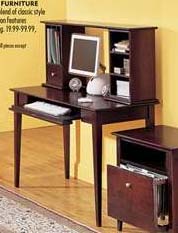 New iMac Sighting: From Dana Baggett, "The Sunday newspaper flyer for Target stores - for the Northeast at least - carries an adv't for furniture on page 15 this week. Atop the computer desk (see right), there is a new flat panel iMac complete with speakers, keyboard and mouse. Ya gotta love it!" It looks very nice to us. Here is the ad.
Saw something? Send a tip or a correction
The archive ran on reader tips. What did you see, where, and do you want the credit? Something wrong on this page? Say so and it gets fixed.