Hands-On Review--Apple 30" Cinema HD Display
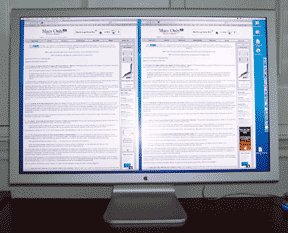
The 30" Cinema replaced our year-old Apple 23" Cinema HD Display and it looks immense in comparison. With a native resolution of 2560x1600 pixels versus 1920x1200 pixels, the 30" screen has 78% more pixels than the 23" screen. We placed the 30" Cinema on a box behind the 23" Cinema in the photo at right to compare both displays. The screen area of the 30" Cinema is about as large as the entire 23" Display, not counting the legs, some two-thirds larger physically in area.
The new Cinema displays are brushed aluminum with white plastic inserts in the left and right ends. The bezel holding the screen is much thinner so, as such, they work better when two or more are used side-by-side as an expanded screen. The L-shaped pedestal gracefully holds the immense 30" screen some 4" off the desk. It tilts easily and holds its postion with no problem. It is also easy to swivel the pedestal right or left on the desk, something that was much harder to do with the previous 23" easel-style display. Still, we really like the overall design of Apple's previous easel-style displays. The new aluminum design more closely matches that of the Power Mac G5 but we think either looks good with it, especially if the Power Mac G5 is on the floor where ours sits.
 The brightness controls for the 30" Cinema are two touch-sensitive depressions in the outer edge of the bezel on the right side of the screen. Our 30" Cinema's screen seems subjectively a bit brighter than our 23" Cinema's but that may be an illusion. At least it does not seem darker. At full brightness, we can feel warmth on our face from the light emitted by the screen while sitting at our keyboard. We use the 30" Cinema set at about two-thirds brightness in a slightly dimmed room but we used our 23" Cinema at full brightness in the same room. Like our 23" Cinema, the 30" screen is nearly perfect as LCDs go, no bad pixels and no obvious light or dark areas. The corners look as good as the center and are just as sharp as expected with an LCD montor.
The only other control on the 30" Cinema is power-related and positioned just below the brightness controls. This touch-sensive depression doesn't turn on the computer and display, one of two things that we do not like about Apple's new display models. Since we keep our Power Mac G5 on the floor beside our desk, we really like the previous easel-style display's ability to turn the computer on and off and to sleep and wake the system with the glowing, touch-sensitive switch on the front of their bezel. For the 30" Cinema, the Display pane in System Preferences provides three options for the power-related control:
- Turns the display on and off
- Puts the system to sleep or wakes it
- Does nothing
We selected option 2. When we originally began using the 30" Cinema, option 2 worked as stated, just sleeping and waking the system when touched. However, now touching the control brings up the power dialog box allowing one to restart, sleep or shut down the system with an additional mouse click or keystroke. We are unsure which software update caused the change but it is a change for the better, in our opinion, even if involves an additional action.
There are two USB 2.0 ports and two FireWire 400 ports on the back of the 30" Cinema display toward the right side with the controls. The location makes it relatively easy to connect and disconnect USB or FireWire devices but a more central location near the pedestal's connection with the screen would be easier to bring cables through the hole in the pedestal to be less messy, a small thing. It's great to have two additional FireWire 400 ports.
Apple's displays no longer come with the excellent ADC connector that carried power and USB. It now comes with what we've termed as a Hydra cable, after the multi-headed monster in Greek mythology. The thick cable coming from the display splits into DVI, USB, FireWire and power cables. The upside is that the industry-standard DVI cable on displays other than the 30" model can connect directly to recent Powerbook G4s, retail graphics cards or PCs without a $100 adapter. The displays also have FireWire ports. The downside, aside from the many connectors, is that the displays have a power brick--one more power plug to accomodate and a power brick to find a place for. Is it an even trade? Well, this is the second thing we do not like about Apple's new displays.
Apple states in many places that an Nvidia 6800 Ultra DDL graphics card is needed to run the 30" Cinema Display. In other places, Apple states that the Nvidia 6800 GL graphics card can be used as well. We now know that it can be run by an ATI Radeon 9600 XT (see our note on 11/27) at a resolution of 1280x800 and probably at higher resolutions by an ATI Radeon 9800 SE. A reader wrote that he saw a demo iMac G5 running one at an Apple reseller. Still, if you want to use the 30" Cinema at its native 2560x1600 resolution, and you will, you need to spring for one of the Nvidia 6800 graphics cards.
In summary, the new Apple 30" Cinema HD Display looks great and works great. The two things we do not like about the new displays, i.e. no power on button and the power brick and cord, are more than compensated for by the quality of the display and the screen real estate. The addition of FireWire ports is topping on the dessert. If you can afford the pretty stiff tariff of $3,299 plus an Nvidia 6800 graphics card for up to $599 you will love this display. It's great for 3D games but if you do graphics work professionally, you need this display.
Saw something? Send a tip or a correction
The archive ran on reader tips. What did you see, where, and do you want the credit? Something wrong on this page? Say so and it gets fixed.