Hands-On Review--Sp@mX 3.0.5, Fight the !@#$%^&'s
As a bit of background, we get some 600-1200 spam messages a day at Macs Only!'s primary email addresses. This is because they have been posted publicly on our web site for a long time and they probably appear on every spammer email list in existence. We use Mac OS X's Apple Mail email client. Apple Mail's built-in junk filter is about 98% efficient at filtering incoming spam from our inbox. Deleting the remaining 2% is not a significant problem. We also have a server-side filter that deletes bounced messages created when spammers fraudulently use our email address as a return address. Fortunately, that one is close to 100% effective because at one time we were getting 1000's of them per day. So what's the problem? Aren't we effectively dealing with spam? Nope.
Unfortunately, some emails that we want/need, usually only about 5 or so messages per day, are miss-classified as junk by Apple Mail's junk filter and end up being sprinkled among the 600-1200 spam messages. Looking though that much spam every day and not being 100% efficient is time consuming and can be costly. In addition, we travel a lot and still get stuck in places where we have to use a dial-up internet connection. The sheer volume of spam takes a long time to download. So, now back to our review of Sp@mX.
Sp@mX uses a fight-back approach to dealing with spam, one that appeals to our ire over the lack of attention to this internet affliction by those who could easily end it if they really wanted to. Sp@mX's approach is to search the header that comes with each email for the owners of the servers and ISPs that handled the spam on its way to one's mail box, contacts them for their addresses to report the abuse and then sends a complaint to those addresses, all automatically. Sp@mX then relies on those entities to block such spam as a result of the complaints.
Does Sp@mX really work? Well, there are numerous testimonials on hsc's web site claiming remarkable results in relatively short periods of time. So we purchased a copy of Sp@mX from hsc for only $19.95 to see for ourselves. Besides, Sp@mX's fight-back approach will at least make us feel good for awhile.
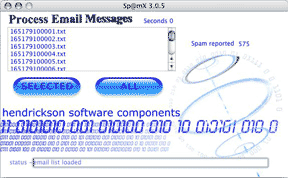 We downloaded our purchased copy of Sp@mX, received an email from hsc with our validation code and installed it. Sp@mX works fairly simply. Spam messages are placed in a folder. That folder is linked to Sp@mX in the configuration window so the spam messages appear as a list in Sp@mX's application window. Then all spam messages may be processed with clicking a single "All" button or they may be processed in smaller batches by highlighting the spam messages and clicking the "Selected" button. The processing time, status and number of processed messages are displayed.
Sp@mX works easily with Outlook and Outlook Express email clients but at present it works less automatically with Apple Mail, something that has rapidly improved over this past week that Sp@mX has been out. The developer, Jeff Hendrickson of Arlington, VA, admitted to us that he was surprised by how many Mac OS X users use Apple Mail. He produced two updates to Sp@mX last week and Randy Padawer produced a free Email Text File Splitter to make using Apple Mail fairly straightforward. Jeff told us that the few extra steps for Apple Mail will be completely automated in a near future update of Sp@mX.
Configuring Sp@mX is relatively simple since it has a Configuration Wizard. It is also easy to configure Sp@mX manually. In the Configure window one just enters one's email particulars, the location of the folder where spam messages are saved for processing, the type of email client (Outlook, Outlook Express or Plain Text Email), the processing timeout (we left it at 10 seconds) and check whether or not to keep a log (we did). We created a folder in the Documents folder of our Home directory named "Spam" in which we save spam messages for processing. We chose "Process Email as Plain Text" for Apple Mail, at least through version 3.0.5 of Sp@mX.
Then we configured the "Do Not Send" list by adding the domain names (like Earthlink.Net) of our ISP and email hosts. The latter is important to avoid getting one's own email blocked by one's complaints so don't forget to configure it!
It is also possible to edit the abuse complaint. We left it the same as the default message.
Since we use Apple Mail (it's for Eudora too), we also download Randy Padawer's application, Email Text File Splitter (ETFS), from hsc's bulletin board. Configuring it consists of selecting Apple Mail or Eudora or Custom and setting the folder where spam messages are saved--Apple Mail and "Spam" respectively in our case.
Using Sp@mX is easy if not completely automatic for Apple Mail at this time. Here are the four steps:
1. Highlight all spam messages in Apple Mail's junk folder.
2. Save them in "Raw Message Source" format (cmd-shift-s) to the folder created to save spam messages. This saves all of them as one file that needs to be split into separate emails to work in Sp@mX.
3. Click the "Split Text" button on Padawer's ETFS application and choose the email file just saved.
4. Launch Sp@mX and click the "Process All" button.
It takes some 1-3 seconds, more or less, to completely process each message for most spam messages. In our experience, only about 10% or less of the spam can not be processed by Sp@mX for one reason or another or they timeout still unprocessed. Messages that use Asian or Eastern European characters do not process for us. Unfortunately, a very few get hung in an endless loop and for some reason do not timeout. The only solution so far is quitting Sp@mX. We have forwarded these spam messages to Jeff for analysis.
We also discovered another issue. After processing about 50-100 messages we get a DNS error message in Sp@mX's status window and processing the spam message hangs while Sp@mX retries the DNS lookup over and over again for this and every subsequent message. Jeff believes this issue is not a Sp@mX coding flaw. Indeed, if we quit Sp@mX, wait awhile and then try again, the offending message and subequent ones process just fine. Could it be that our own ISP's software is tabbing us as a spammer after processing a certain number of messages and then denying us access to their DNS lookup table? Maybe. Anyway, we have adopted the practice of processing no more than 50 spam messages at a time and we have mostly avoided the problem.
A final tip--if one has lots of spam and process it in batches like we do, be careful. We inadvertantly got ourselves deleted from a number of list servers that we subscribe to. In addition, one probably does not want to accidentally report one's grandmother as a spammer.
Has our spam decreased? Not yet, at least not significantly so that we can tell. However, we have been using Sp@mx v3.0.5 for just a couple of days. We do have abuse report responses from ISP's that total about 10% of the spam messages we have processed so far so we know that the complaints are going out. Jeff told us that it could take a few weeks to completely reduce our spam to near zero. We'll provide an update to this review after a couple of weeks. In the mean time, we'll have fun actively fighting back against the @#!$#^&*'s.
In summary, we are intrigued with Sp@mX's spam fighting technique and for $19.95 it's relatively inexpensive. Sp@mX works relatively easily with Apple Mail to process large quantities of spam. And we can't say too much about how responsive the developer, Jeff Hendrickson, has been in answering our questions and in updating Sp@mX to use with Apple Mail. Just ignore that the preferences are in a "Configure" menu rather than under the "Application Name" menu, that there's no "About" window and that Sp@mX v3.0.5 still lacks a Mac OS X Finder icon...we are sure that these cosmetics will come shortly. [Bill Fox]
Saw something? Send a tip or a correction
The archive ran on reader tips. What did you see, where, and do you want the credit? Something wrong on this page? Say so and it gets fixed.