Sonnet's Tempo Bridge for Parallel to Serial ATA Connections--How Fast Is It?
Our parallel ATA-6 hard drives are encased in OWC's cool Elite Pro FireWire 400 cases. That makes them readily available for our variety of Macs but external FireWire 400 is slower than an internal parallel ATA interface and FireWire drives are occasionally afflicted with bootability and mounting problems. While the OWC cases are cool looking, they also require FireWire and power cables. Until recently, we had no other satisfactory option for our Power Mac G5 with its new internal fast serial ATA interface because we have experienced even more problems with PCI ATA controller cards.
Sonnet Technology to the rescue--last month Sonnet announced the Tempo Bridge, a $49.95 adapter for parallel ATA drives to connect to the new serial ATA interface in a Power Mac G5. We immediately ordered one and it arrived a little over a week ago and we immediately installed it and have been using it since.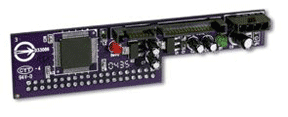
The Tempo Bridge is a small adapter board that connects to the parallel interface on a parallel ATA hard drive. Also included is a short cable that provides power to the drive from the adapter board. Both are easy to install on the hard drive and the drive is very easy to install in a Power Mac G5.
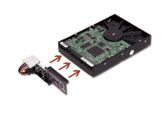 To install a drive in a Power Mac G5, just remove the four black plastic "screws" kept on a panel to the left of the drive bay and screw them into the two holes on each side of the drive nearest the connector. They serve to hold the drive in the slots. Then slide the drive into the bay's slots upside down, attach the Tempo Bridge and its power cable (see left) and plug the two cables kept under the Power Mac's drive bay into the Tempo Bridge. It was very easy to accomplish and there is virtually no chance of cut knuckles and fingers, unlike installing drives in most computer cases.
The drive we installed in our dual 2.5-GHz Power Mac G5 is a very silent and fast parallel ATA-6 7200-RPM 80-GB Seagate Barracuda. This is the same drive that we use in our Power Mac G4 Cubes because of its speed and silence.
So, how fast is it? We ran four of our standard tests that relate to hard drive speed. The tests were run on the drive while in the OWC Elite FireWire case with the Oxford 911 chipset and up-to-date firmware and again in the Power Mac G5 with the Tempo Bridge attached. We also ran our tests on the serial ATA 160-GB drive that came with our Power Mac G5. All tests were run with Mac OS X 10.3.6.
| Test | Ext. FW 400* |
Tempo Bridge*
|
Stock ATA Serial**
|
|---|---|---|---|
| Canned Benchmarks: | |||
| Xbench 1.1.3 - Hard Disk Score |
65
|
86
|
109
|
| "Real World" Tests: | |||
| Startup (sec) |
47
|
40
|
36
|
| Launch Classic Mode (sec) |
11
|
10
|
10
|
| Dup. 700 MB Folder 3600 Files (sec) |
94
|
76
|
62
|
*Parallel ATA-6 7200-RPM 80-GB Seagate Barracuda hard drive.
**Stock Power Mac G5 serial ATA 160-GB hard drive
The 80-GB drive tested out to be 9 to 30 per cent faster hooked up internally with the Tempo Bridge than as an external FireWire 400 drive. But the stock serial ATA drive is faster yet on three of four tests, some 10 to 27 per cent.
In summary, Sonnet Technology's Tempo Bridge at an MSRP of $49.95 is an inexpensive way to add a second drive to the serial ATA drive bay of a Power Mac G5. The drive was very easy to install, the easiest and safest to install that we've ever encountered. Our drive was significantly faster on the internal serial ATA bus with the Tempo Bridge than as a FireWire 400 external drive. It has run flawlessly as our data backup and emergency boot drive. The emergency boot drive was created with Mike Bombich's Carbon Copy Cloner v2.3 since we have an Nvidia 6800 Ultra DDL graphics card installed and are unable to boot with the System CD that came with our Power Mac G5. [Bill Fox]
Saw something? Send a tip or a correction
The archive ran on reader tips. What did you see, where, and do you want the credit? Something wrong on this page? Say so and it gets fixed.