Hands-On Review--Keyspan Cordless VoIP Phone VP-24A
 We have several relatives and friends who live in Spain and Panama and whom we call regularly and occasionally for lengthy periods. The cost of using a normal land line can inadvertently and easily add up to $300 or so a month, even with special rates. So we have been using Skype, a voice over internet protocol (VoIP) service for quite some time with our iMac to make those calls. At 2.1 cents per minute to Spain and 10.7 cents per minute to Panama, our international long distance phone bill rarely tops $30 per month, a huge saving.
Our current 24" iMac Core 2 Duo with built-in microphone and speakers works great with Skype via our cable internet and the calls are usually as loud and clear as with a land line. The only issue is that one has to sit at the iMac to make and receive calls and we occasionally miss an incoming call because no one is near enough to notice it ringing. The solution is a wireless VoIP handset.
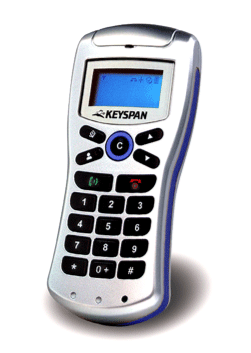
Keyspan, one of the first companies to make USB devices for the Mac after USB was introduced, markets the VP-24A Cordless VoIP Phone (image courtesy of Keyspan)with an MSRP of $79. The VP-24A works via Skype software and services on your Mac. In the box is the VP-24A handset, USB radio receiver, 3 small AAA-size NiMH rechargeable batteries, a USB charging cable, CD with driver and guide and a printed quickstart guide.
The silver plastic handset itself is small and light, easily carried in a shirt pocket. It measures 4.6" tall, 2" wide and 1" thick. It weighs only 3.25oz, much of that from the three AAA batteries. The LCD screen is 128x64 pixels in black on white with a blue backlight.
Setup
Setting up the handset was easy. First, download and install the Skype software and set up a Skype account. We had already done this step but Skype for the Mac is very easy to set up and use these days. Then, install the VP-24A's driver (v1.1.3 is the latest) and user guide off the Keyspan CD. Three rechargeable NiMH batteries went into the handset and an included USB cable between the handset and Mac charged them fully. Finally, the USB receiver was plugged into the Mac, a button on it was pressed to pair it with the handset and the sound output was set to the handset in the Sound pane of System Preferences.
Use
Using Keyspan's VP-24A Cordless VoIP Phone was also very easy since it works very much like a standard cell phone but via Skype. To turn the handset on, we pressed and held the red "phone" key for 3 seconds. To place a call, we pressed the "C" button, used the arrow keys to scroll through the phone numbers stored as contacts in Skype displayed on the handset's screen and then pressed the green "phone" key to place the call. One may also use the numeric keys to directly enter a phone number.
We made calls from throughout our two-floor building. Keyspan's VP-24A handset worked great everywhere on both floors through walls up to about 40-50' away. Approaching 60', the people we called complained of poor reception of our voice signal. Keyspan claims up to 30m but even so, we got as good a reception distance as with any other Wi-Fi device in our building.
Keyspan's VP-24A handset uses 2.4GHz Wi-Fi (channel 36) to communicate between the handset and receiver, the same Wi-Fi radio band that our AirPort Extreme and Express Base Stations use for the wireless network in the same building. We noticed no effect on our wireless network.
Summary
In summary, Keyspan's VP-24A Cordless VoIP Phone is attractive, small but not too small and easy to setup and use. Our only complaint is that the screen's font is on the small size and a little dim for our aging eyes. Still, it works great with Skype on our iMac C2D over a cable modem. The Skype VoIP software for Mac and service has come a long way and it's now a terrific and economical way to make voice calls across the nation and around the world. The Skype software is free as is calling anybody anywhere on their computer. Calling any land line or cell phone in the U.S. and Canada costs only $29.95 per year and international rates start at 2.1 cents per minute. Keyspan's handset makes it easy to use Skype well away from your Mac. [Bill Fox]
Saw something? Send a tip or a correction
The archive ran on reader tips. What did you see, where, and do you want the credit? Something wrong on this page? Say so and it gets fixed.