Hands-On Review of Keyspan USB Card

Hands-On Review: Keyspan USB Card
Keyspan Price: $59 list, $49 street
December 17, 1998 (Originally posted October 27, 1998)
Pros: Allows a Mac to use peripherals with Universal Serial Bus connections, hot swapability of USB peripherals, well-made, easy to install, excellent documentation, a 5-year warranty and a reasonable price.
Cons: USB ports difficult to find in the back of a computer and to align the connector by feel, a hot-swapable anathema.
Rating: Outstanding, 4.8 out of 5 Exclamation Points: ! ! ! ! !
Apple took a giant leap into the future and towards Wintel compatibility when it included Universal Serial Bus (USB) ports, four of them, in its new iMac along with an ethernet port and a modem port. No ADB ports (mice, keyboards and game devices), SCSI ports (drives and scanners) nor Apple serial ports (external modems, printers and digital cameras). The USB is the wave of the future since it is implemented in Windows 98 and USB ports now come standard on most Wintel computers, desktops and laptops. A slew of peripheral devices are coming out that make use of the port. All that is needed for them to work on a Mac is a software driver to connect up with the Mac OS.
Other than for compatibility with Wintels, why a USB port instead of the traditional ports included on a Mac? First is speed of data transmission. USB ports at their high speed rate of 12 Mbps (1.5 MBps) are much slower than SCSI ports (5-160 MBps) but are faster than 10base-T ethernet (10 Mbps) and much faster than Apple serial ports (0.2 Mbps) and ADB ports. Second, USB ports are more idiot proof, i.e. they are hot-swapable, meaning devices can be connected and disconnected while the computer is on. Apple serial ports have this capability but SCSI and ADB ports do not. Hot swap a SCSI or ADB device and you'll likely wreck the port, the motherboard or the device.
Okay, that's great for the iMac but what about PowerMacs? So far none of them have USB ports from the factory. That is where Keyspan comes in. They have developed a USB card that fits in one of the standard PCI slots in PowerMacs and clones. The Keyspan USB card provides 2 USB ports. It should be shipping shortly.
Finally, a word about USB port software drivers. You can't just buy any Wintel USB PCI card and plug it into the PCI port and plug in a USB peripheral. It won't work. Welcome to the wonderful Wintel world of software drivers. Those who have made extensive use of the PCI cards in Macs know this already but a driver is needed for the USB card so it can work with the Mac OS and another driver is needed for the peripheral so that it works with the Mac OS. Apple is developing drivers for USB port cards and standard devices such as keyboards. While Apple has made drivers available to developers to develop products and has included them in the Mac OS ROM file in iMacs, Apple has not licensed them for use in USB PCI cards as of the date of publication of this review. The port drivers are not included with Mac OS 8.5 except again as the Mac OS ROM file for the iMac. Future PowerMacs with USB ports and Mac OS ROM files will also have USB drivers included in their Mac OS ROM file. To be legal, one must buy a USB card with licensed drivers. The Keyspan USB card will be one.
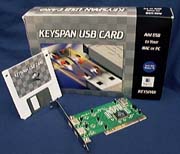 What you get
The Keyspan USB card comes well-packed in a box with a 1.4 MB floppy disk (shown at right). Foam pads keep the card from moving around. A manual and Apple's USB drivers licensed to Keyspan come on the disk.
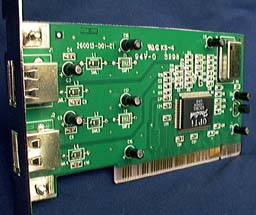
The card appears very well manufactured with lots of tiny components attached using surface mount technology. Only eight components stick up that could be bent, far less than corresponding Wintel PCI USB cards that I have seen. As a matter of fact, the Keyspan card will work in a Wintel as well as a Mac.
The manual is a file on the disk in HTML format and it can be read with any web browser. It includes 25 images which make installation and setup a snap. The seven chapters cover a basic introduction, installation of the card and software, connecting USB peripheral devices, connecting USB hubs, troubleshooting, references and an extensive FAQ. The manual is more than expected for a simple PCI card and in that light it is excellent. However, one will need a very good memory or to print it out since the computer will be off during installation. This is a common gripe for so-called on-line manuals but it substantially reduces the cost of delivering the product. In this case, it is a good thing since installation and setup are relatively simple and the manual is of corresponding small size (10-15 pages at 10pt Courier is my guess) so is quickly printed out.
Installation and Setup
The manual has only 3+ pages covering installation of the card (shown below at left) and driver extensions but that is all that is needed with the good set of illustrative images. Installation and setup are easy. The photo below shows the flange with the two USB ports at the left end of the card. It also shows the PCI connector with the gold contacts along the bottom of the card.
 First, the computer's outer case is opened and the PCI slots located on the motherboard.
Second, the PCI slot cover in the case is removed.
Third, The USB card is pressed straight down into the PCI slot with as little rocking motion as possible. PCI slots are very stiff so considerable pressure is needed to seat the USB card all the way down into the slot. The gold connectors on the board should be all the way down into the slot and not visible. If it is not seated all the way, it won't be "seen" by the Mac OS and won't work. Seating is the first thing to check if there are problems.
Fourth, the screw that held the slot cover is replaced to hold the top of the card's flange down and keep the card solidly in the slot.
Fifth, the computer's outer case is closed.
Sixth, The computer is started up and the USB drivers are installed from the disk to the computer's extension folder in the system folder following the manual's instructions.
That's basically it. I followed these steps and installed the Keyspan USB card in a PCI slot in my Apple PowerMac 9600 and then in my PowerComputing PowerBase 180. Keyspan provided a final production version of the card but it has not been released to retail customers yet since Apple has not yet licensed the USB drivers for USB port PCI cards. I used the beta version of the drivers for developers and testers in order to do this review. Licensing and the availability of the USB card is imminent.
Use
Presently, there are a limited number of USB devices available and very few of them that work with the Mac OS. All of the currently available Mac USB devices are designed for the iMac. There are also USB keyboards, mice and other standard input devices for Wintels that should work with the standard Apple drivers when released, i.e. not needing specific drivers themselves unless they have some nonstandard features. I used the keyboard and mouse from an iMac and an Imation SuperDisk Drive for the iMac to test the Keyspan USB card.
Sure enough, after powering up the computer I plugged the keyboard and the mouse into the USB ports and both worked fine. The regular ADB keyboard and mouse still worked along with those plugged into the USB port. This is because Apple has provided an ADB/USB shim in the drivers to allow ADB keyboards and mice to work with USB products connected to the USB ports. The downside of this is that the USB keyboard and mouse do not function until near the very end of the startup sequence, i.e. after the desktop has appeared and during the same time that it normally searches for and mounts any active external SCSI devices on the desktop. Therefore, USB keyboards and mice can not be used for any task during the startup sequence, e.g. to enter passwords for network connections or to modify Extensions Manager settings, so the ADB devices may still be needed. Hopefully, this will be a selectable option in a future version of the Apple USB driver. The alternative, I guess, is a special Mac driver for the standard Wintel input devices which seems unlikely to happen. After all, a major benefit of USB is simple cross-platform compatibility.
The Imation SuperDisk Drive has its own specific USB drivers and I installed them on both computers. The SuperDisk Drive worked for the most part on both the 9600 and PowerBase. I could plug it in with the computers on and it functioned, recognizing and mounting 1.4 MB floppy disks and 120 MB superdisks. Copying very large files of 117 MB, 88 MB and 43 MB worked fine. It also happily copied files of less than 1 MB in size. Keyspan President Mike Ridenhour noted that their SuperDisk Drive copy tests with a 4.8 MB file under Mac OS 8.0, 8.1 and 8.5 worked fine with a 6400, 6500, 7200, 9500 and a G3. [Ed. Note: A bad SuperDisk Drive or a G3 CPU card tuned too high for Mac OS 8.5 caused copying problems in tests reported earlier that had nothing to do with the USB card.]
Hot swapable? You bet. I plugged in and unplugged the USB devices several times on both computers running with no problem. This is a great feature which is only surpassed by the higher speed of current SCSI ports.
One suggestion from my testing is a simple ergonomic point. The USB ports on the card should have a raised plastic lip and the raised plastic lip should have a bump to indicate the correct side of the plug. The reason for this should be obvious but the ports end up being in the back of PowerMacs and clones. Since they are hot swapable, one can connect to them with the computer turned on but the port is very difficult to find when reaching behind a running computer and even more difficult to correctly align the connector to plug it in. USB "A" connectors go in oriented in only one way and the difference is only visible on the connector and in the port, not blindly feelable on either. Flip the connector the wrong way and it won't go in the port if it can be found or the port could be destroyed if trying too hard to push the connector in the wrong way.
Conclusions
The Keyspan USB Card worked as advertised with no problems. It allows any PowerMac/clone with PCI slots to use the latest USB port technology that will work on a Mac. The benefits are hot swapability like Apple serial ports but greatly increased speed for serial devices and greater compatibility with devices designed for the Wintel market. The Keyspan USB card appears well-made and it was easy to install. The documentation is much better than expected for a low-cost item. It can be viewed with any web browser and step by step images are included. No one should go wrong. Keyspan also offers the industry longest warranty at 5 years. The investment needed for being able to tap into this marketplace-exploding technology is quite reasonable, less than $50.
Copyright © 1998 by Bill Fox
All rights reserved--no commercial use permitted without attribution.
Of course . . . . . . and I am proud to be an Evangelista! . . .
Saw something? Send a tip or a correction
The archive ran on reader tips. What did you see, where, and do you want the credit? Something wrong on this page? Say so and it gets fixed.