Review of iMate

Hands-On Review: iMate ADB/USB Adapter
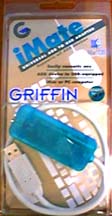 Griffin Technology, Inc. Price: $39 list
December 7, 1998 (Rev. 2/14/99)
Pros: Works as advertised, provides great versatility, simple to install and use
Cons: iMate extension is out but still in beta
Rating: Excellent, 4.7 out of 5 Exclamation Points: ! ! ! ! !
If you have or want an iMac and have a required or cherished peripheral device that connects to or gets power from an Apple ADB port, like a keyboard, mouse, joystick, trackpad, trackball, bar-code reader, dongle, Apple vision display and Color QuickCam, then Griffin Technology has come to your rescue with the inexpensive iMate. While the display and QuickCam also require Griffin Technology's iPort (reviewed here), the other devices require only the iMate. If they are standard devices, then no additional drivers are needed beyond those included by Apple in the iMac's Mac OS ROM extension or the USB drivers that may be downloaded to use with a PCI USB port card such as the one made by Keyspan (reviewed here). In fact, the iMate when coupled with a PCI USB card in a PCI PowerMac provides an additional ADB port, one that is hot swapable at the USB connection. Griffin Technology provided an iMate for evaluation.
What you get
The iMate comes in a clear plastic 4"x8" pack shown above. The instructions are printed on the back of the backing card. A piece of software, the iMate extension, must be downloaded from Griffin's web site if it is needed for dongles and devices with nonstandard ADB port drivers. That's it.
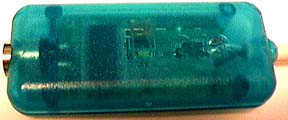 The iMate is bondi blue translucent device about 3" long. It has the ADB port on one end (left in the photo at right) and a 15" USB cable with an "A" connector extending from the other (right) end. The electronics inside that convert the USB port to an ADB port can be seen. The iMate has a tiny activity LED in its very center that glows green when data passes through it.
Installation and Setup
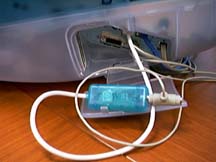 One simply connects the ADB device to the iMate's ADB port and plugs the iMate's USB connector into a USB port on the iMac or PCI card for a PowerMac. The photo at left shows the iMate's white USB cable connected to a USB port on the iMac and the ADB power feed for my Logitech Color QuickCam plugged into the iMate's ADB port. The QuickCam's Apple serial connector is plugged into the Griffin Technology iPort which can be seen just below where the iMate is connected to the iMac.
The iMate's cable easily runs out through the space under the port compartment door with the other cables to retain the clean, snake-free look of the iMac.
If you have dongles or need to use special ADP-port device drivers, then the iMate extension must be downloaded from Griffin's web site and placed in the system folder's extension folder. There is nothing else to it.
Use
I tried several ADB devices: an Apple extended keyboard and mouse, together and separately, and a Logitech Color QuickCam. The iMate has these special features which I checked:
It doesn't need any drivers for standard ADB devices.
It allows software startup on the iMac.
It is hot swapable at the USB connection.
It is a universal USB/ADB adapter not just an iMac device.
 Tapping the power key on the Apple extended keyboard attached to the iMac via the iMate started up the iMac just as the power key does on the iMac's keyboard or front panel. Both keyboards worked when both were attached allowing two people to work on the same iMac, not instantaneously of course but sequentially. The same is true for both mice. This capability facilitates student/teacher interactions on the same computer. I unplugged the iMate's USB cable, attached an ADB mouse alone and replugged the iMate into the iMac--no freeze and it worked normally. I repeated the hot swap several times. These actions demonstrated the first three features listed above.
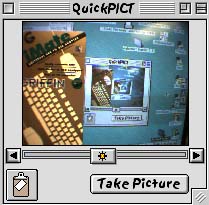
Next, I installed v2.1.2 of the software for Logitech's Color QuickCam on the iMac and shut it down. Then, the QuickCam was connected to the iMate's ADB port and the iPort's Apple serial port. When the iMacwas started up, there was the QuickCam's window working just as well as it had on the PowerMac 8500 to which it had been connected. A screen shot of the QuckCam's window is shown above at right. The QuickCam was pointed at the iMac's screen for the shot.
Finally, I connected the iMate to an Apple extended keyboard and mouse and plugged it into the USB port on the Keyspan USB Port PCI card in a PowerMac 9600. On PowerMacs, USB devices do not work until the desktop appears due to Apple's ADB shim in its USB driver for non-iMacs. However, the current beta USB Manager loads much earlier permiting USB devices to be used before the extension icon screen march. The keyboard and mouse attached via the iMate worked perfectly after startup. I also tried hot swapping the them at the USB connection several times and only once did it caused a freeze when the USB connector was plugged in.
Conclusion
The iMate ADB/USB port adapter is excellent. It worked perfectly on all of the tasks that it is designed to accomplish. The instructions are minimal and clear. The iMate is simple to attach and use on both an iMac and a PowerMac with a USB port PCI card. It is hot swapable at the USB connection. I didn't try the ADB connection since ADP ports are notorious for shorting out if hot swapped. It worked on both an iMac and a PowerMac. It is a universal ADB/USB adapter that should also work on a Wintel PC to run Mac ADB devices according to Griffin Technology. The only thing preventing a 5-Exclamation Point outstanding rating at this time is that the iMate extension has not been released in final (it's v1.0b3) so that non-standard ADB devices like my Logitech Cordless Mouse and Gravis Mouse Stick II could not be tested. I will do so when the extension is final. Still, I highly recommend the iMate for anyone needing an ADB port on an iMac or another one on a PowerMac.
Copyright © 1998 by Bill Fox
All rights reserved--no commercial use permitted without attribution.
Of course . . . . . . and I am proud to be an Evangelista! . . .
Saw something? Send a tip or a correction
The archive ran on reader tips. What did you see, where, and do you want the credit? Something wrong on this page? Say so and it gets fixed.