Review: Mac Picasso 540
Graphics Accelerator
Company: Village Tronic
North American Distributor:The Software Hut
Price: $199.95 (Reduced as of 2/27/98)
Pros: Performance and software are outstanding, packaging is exceptional
Cons: Manual needs further work
Performance Rating: Excellent, a 4+ out of 5
The
Mac Picasso 540 (MP540) is a graphics accelerator board for PCI Power Macintoshes
but it is more than that. The MP540 is the main board for a family of board
modules that connect together to yield a complete set of graphics functions
in one unit. The MP540 provides 2D graphics acceleration. The Pablo module
provides TV and video output. The Paloma module provides TV and video input
along with stereo audio input and output. The 3D Overdrive board supplies
super 3D graphics with its 3Dfx Voodoo chip set to turn your PowerMac into
a 3D graphics workstation and excellent game machine. Village Tronic provided
a Mac Picasso 540 for this review. The 3D Overdrive will be reviewed at
a later date.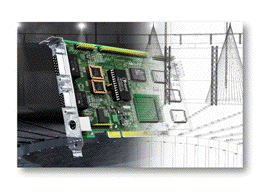
Mac Picasso 540
The MP540 looks well-laid out and well-constructed. In the photograph to the right, one can see the three video ports, an Apple monitor port, a VGA monitor port and an S-VHS port that is used with the Pablo module. The main graphics chip, a 64-bit Cirrus Logic GD 5480, with a green heat sink attached is also visible. The board contains 4 MB of graphics RAM and supports visible resolutions from 320x200 to 1600x1200 and virtual resolutions up to 2432x1712 pixels. The MP540 supports millions of colors up to 1152x870 pixels at a 75Hz refresh rate and thousands of colors up to 1600x1200 pixels at 75 Hz. It supports virtually every type of monitor, new and old, including the older workstation "synch-on-green" monitors and includes gamma correction and a 200 MHz pixel clock.
The MP540 arrived in a small 7x9x2-inch, beautifully-illustrated and colorful box--much like those containing the most recent 3D game software, a fitting analogy. The board itself was tightly packed in a bubble-wrap envelope so the card was well-protected. A 72-page manual was included. While the packaging was first class in presentation and protection, the manual is still a work in progress only recently being translated into U.S.-Canadian English. The copy I received was v1.5 and covered installation of the hardware and software plus the use many of the features and settings. The hardware installation illustrates placing the MP540 in a PowerMac desktop and tower configuration. Actually the manual is fairly good if one is already conversant in high resolution graphics but lacks some detail necessary for the near novice to grasp "how to do it" with all the features of this graphics board and its software controls. For example, the "Timings" window allows one to establish some 16 settings to use any type of monitor and, while each setting is described, one would have to be an engineer to figure out how use it to configure for an old or unusual monitor type. However, for the most part the manual is easy to read and despite some mixture of The Queen's English and non-English spelling and grammar, most of the main features are reasonably well-enough described to allow their use quite easily.
Test Computer
I used the MP540 in both a PowerBase 180 and a PowerMac 9600 (with either a PowerLogix PowerForce G3 250 or a 604e/200 MHz CPU) but all the real testing was done in the PowerBase 180. The principal reason for this is that most graphics boards are tested or reviewed in higher end computers and I wanted to provide the low end PCI Mac user some specific performance information on this high end graphics board. Besides, I know that Mike Breeden is also reviewing the MP540 on his excellent Accelerate Your Mac! site and he uses high end computers like the 8500, PowerTower Pro, PowerCenter Pro and PowerMac G3 MT. In summary, the test computer is:
- PowerComputing PowerBase 180
- 180 MHz 603e CPU
- 512K L2 Cache
- 32 MB RAM
- 1.2 GB Seagate IDE internal hard drive
- Mac OS 8.1 with Motorola's LibMotoSh math library
- Virtual Memory on at 1 MB
- 1024K disk cache
- Standard built in ATi graphics with 3D acceleration, 2 MB VRAM, VGA & Apple ports
- 17" RIC (Really Is Cheap?) monitor with a resolution up to 1152x870 and a VGA connector with an Apple adapter
Installation
I installed the MP540 in a 9600 and a PowerBase 180, the test platform. All one has to do is unfasten the screw holding a slot cover, remove the cover and press the board into the respective PCI slot on the motherboard (9600) or riser (PowerBase). After properly lining it up in the PCI slot, one should press the board into the slot with a minimum of rocking motion. It must be seated all the way down. This was really hard in the 9600 as the slots are very stiff and I had to apply a little rocking motion to get it to seat all the way down. In the PowerBase, it just pressed right straight to the bottom with steady pressure so there is some stiffness variability among PCI slots. On the tougher slots it always feels like one is going to crunch the motherboard. For the tests, the monitor was connected with the Apple adapter to the Apple port rather than to the VGA port because there are many Apple monitor users and I wanted to check out the Apple port. I could have more easily used the VGA port since my monitor has a VGA connector which worked just as well as the Apple port.
The software called "Monitors & Picasso" (M&P) comes on a diskette. I received version 2.5 of the software package and v1.5.2 of M&P. The diskette contained an installer in English and one in German plus "Read Me" files in both languages. The English Read Me stated that the diskette contained an early assembly of software that would be updated. It did not, for example, include the Disable and Enable Mode applications mentioned in the manual to prevent some software from switching some monitors to unusable resolutions. Village Tronic supplied these to me separately upon request since I had one program that caused my monitor to switch to dark when launched. The Disable Mode application fixed this problem. Later I learned that this function has been built into M&P under Mac Picasso Extras --> Mac Picasso Utilities --> Lock Video Mode. The manual will be updated for this new feature. Clicking on the Installer places the Monitors & Picasso control panel and MacPicasso_Accel_PPC, MaPi_MPEG_Accel 1.0 and MaPi_YUV_Accel 1.0 extensions in your system folder.
That's it. Pretty simple.
Configuration
The software is marvelous. Monitors & Picasso (M&P) essentially replaces the monitors portion of Apple's Monitors and Sounds control panel. Most of its functions work with any graphics card and monitor. Launching M&P opens a large window with most of the settings and a small window that brings up such settings as gamma correction, shift screen and timings. The large window has a large window for adjusting the positions and relationships of multiple monitors. Each monitor is depicted with its graphic card and monitor information and a small window with buttons to switch which is the main monitor--a key feature is the beautiful handling of multiple monitors. It also has a readout of the kind of monitor if one has a DDC-2b capable monitor--it turns out that none of mine are--for use in keeping track of multiple monitors. There are radio buttons for setting the color depth from 256 to millions or black and white and Resolution and Refresh rate pop up menus for selecting them separately--using the option key, one can also get all the available refresh rates for each resolution and select the two at the same time. Here's a screen shot of M&P.
The PowerBase's built-in video provides for 8 landscape-only resolution/refresh rates from 512x342 pixels @ 85 Hz to 1280x1024 @ 75 Hz for my RIC 17" monitor, however, the monitor tops out at 1152x870 @ 75 Hz and millions of colors. The MP540 allows 27 visible resolution/refresh rates from 320x256 @ 50 Hz to 1600x1200 @ 75 Hz with several more virtual resolutions to 2432x1712 @ 75 Hz. There are also portrait resolutions like 640x870 or 832x1248 as well as landscape.
M&P's gamma setting allows linear, Mac standard, Mac gray and uncorrected gamma settings. Best of all, a picture pops up so one can easily see how the corrections affect the hues and crispness of images.
Shift Screen is a neat feature. It allows one to easily shift the display image around on the screen in 8 different directions using mouse clicks rather than using two settings on those tiny monitor buttons with additional buttons for plus and minus to move the image--just try adjusting in eight different directions with those buttons, its easy with M&P's Shift Screen.
Use
Still: I tried all the resolutions that worked on my monitor up to 1152x870. The best seemed to be 800x600 @ 85 Hz for average use. It was clear and crisp on the MP540 and it gave quite a bit of workspace. However, for my aging vision I really like the 640x480 @ 85 Hz for readability when doing word processing and email. The display at each common setting seemed superior with the M&P but not by a lot, possibly constrained by my inexpensive monitor. There are just a lot more setting options on the MP540 to optimize for a given use, including portrait resolutions.
Motion: Village Tronic supplied several MPEG movies. I used one that shows the MP540 card as the camera rotates all around it and does fly-overs, fly-bys and swoop-ins for about a minute showing off every nook and cranny of the card.
Here are the results in frames per second for the PowerBase's built-in video and MP540 using the largest possible screen size for the given resolution:
| Resolution @ Refresh Rate (Hz) | Screen Size | Built-In Video (FPS) | Mac Picasso 540 (FPS) |
|---|---|---|---|
| 640x480 @ 85 | Full |
10 |
29 |
| 800x600 @ 85 | 3/4 |
10 |
28 |
| 1152x870 @ 75 | 1/2 |
10 |
16 |
The higher the frame rate, the smoother is the action and the MP540 had a frame rate nearly three times that of the built-in video at the usual full screen game resolution of 640x480. The MP540 does a super job partly, I think, because of its 4 MB of SGRAM versus the 2 MB of Video RAM in the PowerBase's built-in video. Unfortunately, I didn't have a spare 2 MB of VRAM to check since the built-in video allows one to upgrade to 4 MB. The MP540 also produced very sharp images with no discernible pixels while the images from the built-in video had clearly discernible lines and larger grainy pixels at each resolution tested.
Games: I only had time to "thoroughly" try one game, Quake for the Macintosh. I write "thoroughly" to be honest since I am not an avid gamer. It took me some time before I found out that I didn't have the latest version 1.0.8.4 -- v1.0.8.3 came in the box that I bought a couple of weeks ago. It also took me some time to learn some of the tricks for optimizing that are not contained in the pitiful manual or Read Me file. All of this consumed valuable review time before the MP540 had to be returned. I got Quake because it has RAVE and 3Dfx versions so that one can compare a variety of video cards and specifications. Neither the built-in video nor the MP540 alone support RAVE or 3Dfx, however, the 3D Overdrive with the MP540 does and will be reviewed later. Having spent many hours several years ago addicted to playing Marathon and Marathon II, I really enjoyed Quake. Shoot'em computer games have come a long way from "Space Invaders" and indeed a long way from Marathon. The images in Quake with even the built-in video are marvelous. Okay, now to the point--how well did the card work?
Both the built-in video and the MP540 allowed me to choose a game resolution of 640x480 at full screen. However, with the built-in video the frame rate was so poor that it was hard to shoot the bad guys because the low frame rate frequently resulted in aiming to the left and then to the right of the bad guy. One could also see large pixels in the image background even at a distance. I had to reduce the resolution to 512x342 and a 3/4 screen image to get an acceptable frame rate out of the built-in video. This isn't too bad on a 17" monitor as the image is still quite large but it clearly detracts from the enjoyment of the game, like looking at it through a hole. On the other hand, Quake performed perfectly on the MP540 at 640x480 and full screen. The frame rate was excellent so there was no jerkiness and the background of the images looked great until very close up.
Conclusions
The Mac Picasso 540 is an excellent high/multiple resolution graphics accelerator that is designed for near workstation performance in a Macintosh for a reasonable price. It does that job and also runs 3D games very well even when compared against the fairly upscale built-in 3D accelerated video of the low end PowerComputing PowerBase PCI Mac. The MP 540 is the base module of a modular system. It provides excellent base graphics acceleration and is expandable to TV, video capture and 3Dfx/RAVE 3D acceleration by adding other modules rather than new boards. If a particular module becomes outdated, then it can be upgraded instead of replacing an entire board. The software, Monitors & Picasso, for controlling the MP 540 is an especially remarkable achievement in features and in the ability to use virtually any type of monitor. As Marc Schmitt of Village Tronic says "if it has a tube, you can use it!" The MP540 retails for $199.95 (as of 2/27/98). I think the Mac Picasso 540 does its intended job extremely well.
Copyright © 1998 by Bill
Fox.
All rights reserved--no commercial use permitted without attribution.
Of course . . .
. . . and I am proud to be an Evangelista! . . .
Saw something? Send a tip or a correction
The archive ran on reader tips. What did you see, where, and do you want the credit? Something wrong on this page? Say so and it gets fixed.