Review of Connectix Virtual Game Station v1.1

Hands-On Review: Connectix Virtual Game Station PlayStation emulator v1.1
 February 22, 1998
Connectix, Inc. Price: $49.95 list
Pros: Runs most PlayStation games without a hitch, often as well as a real PlayStation
Cons: Not compatible with all PlayStation games. Can't realistically run on non-G3's.
Rating: Very Good, 4 out of 5 Exclamation Points: ! ! ! !
Not for nothing did the Connectix Virtual Game Station get some of the biggest cheers (including a "Best of Show" award) at January's MacWorld. It's a can't-miss combination: take the most under-represented software category on the Mac (games), combine it with the software platform that has the best distribution and a huge library (the Sony PlayStation), and leave it to the Mac's pre-eminent third-party geniuses (Connectix) to glue it together.
For the uninitiated: the Connectix Virtual Game Station is an application that allows G3 Macs to run software originally meant for the Sony PlayStation, the leading "console" video-game platform. Installing CVGS opens the door to hundreds of game titles, including titles, series and even whole genres that have never been available on the Mac.
Installation:
Connectix is straightforward in their minimum requirements for CVGS: an Apple-manufactured ("factory original") PowerMac G3, including G3 PowerBooks and iMacs. Older systems upgraded with G3 CPU's don't count. Apparently, it's not just the CPU -- it's also the need for CVGS to run on a fast system bus and have ATI graphic accelleration. For what it's worth, readers have reported running CVGS on upgraded Macs and even PowerComputing 604-based clones but at the expense of quality sound, performance and responsiveness. [Last minute note: At Macs Only! CVGS installed okay on a 9600 with a 200 MHz 604e CPU and a system bus speed of 50 MHz and on a PowerBase with a PowerLogix G3 card at 292 MHz and a system bus speed of only 40 MHz. However, Tomb Raider III is the only game tested extensively so far on the 9600/200 -- it is very marginal. More in a later update to this review.] Also needed are Mac OS 8+, 10 MB free RAM and 3.5 MB of hard disk space.
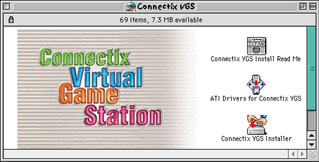 The Connectix v1.1 CD prompts users through a two-step installation process to make sure the graphic drivers are up to snuff. First, double click on the ATi Drivers installer which installs the latest drivers needed for CVGS. Then double click on the CVGS Installer and reboot. There is nothing more to it -- very simple on a "factory original" G3. In contrast, the original Macworld version 1.0 CD is more complicated in that it is not very clear as to which of two ATi driver installers one is to use. Thankfully, Connectix fixed this in the public sale version 1.1 CD.
CVGS also installed easily on the 9600/200 since it has an ATi Xclaim VR Pro graphics accelerator card and an Apple 12x CD drive using Apple's CD/DVD Driver v1.0.1 extension and Mac OS 8.5.1. The PowerComputing PowerBase has a base ATi RAGE II graphics chip but a non-Apple 8x CD drive. However, the CD drive uses Apple CD ROM v5.3.1 extension from Mac OS 7.6 installed with Mac OS 8.5.1.
After the restart, you will end up with a PlayStation emulator on your Mac, and that's where the fun begins. Since emulation is demanding, you have to give CVGS every performance advantage you can -- in short, this means disabling virtual memory and/or RAM Doubler. It's not clear whether disabling other extensions provides much of a benefit. Connectix says that version 1.1 gains a slight benefit from extra RAM, but that its allocation should never be set higher than 12,288 K. With a little extension-disabling, this means it could run nicely on a standard 32MB iMac.
The interface is simple to the point of non-existence -- CVGS 1.1 even installs an extension which automatically runs the application when a PlayStation disc is inserted in the drive. When you do want to set your options, hit the "esc" key. The preferences are limited to volume, controls, and a setting to play cinematic (Motion-JPEG) sequences in "millions of colors" mode. This is in sharp contrast to the other leading game emulator for the Mac, the arcade-game emulator MacMAME, which has several panels of settings for discrete control of sound and graphics emulation. With CVGS, one size -- full screen 640x480 -- apparently fits all.
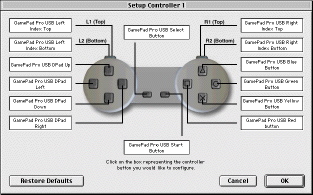 As you can see from our screenshot, we tested CVGS with a Gravis GamePad Pro USB, essentially a USB version of a standard 10-button PlayStation control. While keyboard control of CVGS is tolerable, especially after you set up a configuration that works for you, playing with a proper game controller is vastly preferable. CVGS works with any controller that uses Apple's Game Sprockets, and the photo of the Gravis control on the back of the box leaves no doubt about Connectix's preference.
But if you've crawled through this much of the review, you've gotta be wondering WHAT ABOUT THE GAMES, MAN?! Well, sorry to wimp out, but... it depends.
Performance:
The quality of gaming on CVGS is wildly erratic, and those who doubt that claim can check out the Macs Only! CVGS Watch page, in which our readers have rated dozens of games. There are plenty of 10's -- games rated as playing perfectly on the Mac. But there is a surprising number of 1's and 0's, games that will not play at all ("Resident Evil", "Wing Commander IV"), or have such significant flaws that they're essentially unplayable ("Final Fantasy Tactics", which typically takes over 100 hours to complete, crashes CVGS when you try to save your game).
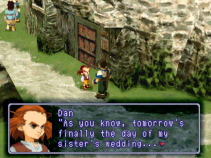 Strangely, it's almost impossible to guess in advance what games will present problems for CVGS. We expected high-speed 3D action games to offer the most trouble, yet "Metal Gear Solid" and "NFL Blitz" were perfectly playable in CVGS 1.0, and are virtually indistinguishable from their true-PlayStation versions in 1.1, even on a Rev/A iMac. But the more prosaic role-playing games from Squaresoft show frequent slow-downs and frame drops, the worst example being the recent "Xenogears" (pictured at left), which suffers half-second-long graphic jumps almost in time to its warped soundtrack. The puzzle game "Roll Away" has unintelligbly mangled graphics, and "Hot Shots Golf" reportedly can't even get past its set-up screen.
For the time being, CVGS players who don't already own a PlayStation will want to make judicious use of rentals and resources like the CVGS Watch before purchasing games, to make sure they don't spend $40 on a game CVGS isn't able to play. The need for caution can't be stressed enough -- Connectix's initial list of compatible games included "Final Fantasy Tactics", without mention of the save-game problem noted above.
It's a shame that CVGS doesn't have the hassle-free compatibility of Connectix's "Virtual PC", and the wide array of incompatibilites makes it seem like the product could have benefitted from more testing.
Also, two usability notes are in order: if any other application is running when you start CVGS and you don't usually use 640x480, you'll get a Finder alert that your pop-up folders have to be converted to regular folders because of the resolution switch, and your desktop items will get rearranged. It's not a problem if you just remember to quit your other apps before launching CVGS. Secondly, the application will not run pirated software or games meant for use outside North America... so you can cancel your order in Akihabra for "Final Fantasy VIII" and wait for the US version like the rest of us.
| Kit and Kaboodle:
There are also some omissions from the virtual PlayStation that we hope will be addressed in future releases. The first is that while it's a simple matter to create virtual "game cards", which are used to save games, configurations, teams, etc., there are no tools to manage the data on those cards. Real PlayStations come with an on-screen utility to copy "blocks" between cards or delete them. More importantly, the virtual game cards show up to the virtual PlayStation as "unformatted", and not all games can properly handle an unformtted card. As an aside, a company called InterAct Accessories makes a product called the "DexDrive" for PC's, which allows PlayStation game cards to be copied into PC files and sent over the internet. A Mac USB version of the DexDrive, one that could read and write the CVGS format, would be a boon to players, allowing them to copy games between their virtual and real PlayStations. As it is, the DexDrive primarily serves to enable cheating by PC-owning children who are too lazy to play their own games. The Connectix product also does not emulate the serial port on a PlayStation, which can be used to link two PlayStations together for head-to-head gaming. Given the unwieldy set-up this requires -- two TVs, two PlayStations, and two gamers, all within just a few feet of each other -- it's not surprising it's somewhat of a dud among real PlayStation users. It would be much more practical for gamers if CVGS could emulate the data-port over a network connection, allowing players to link two Macs across the office (or across the room with an ethernet crossover cable), but issues like network latency probably make such a feature unlikely. You Got Game? There are plenty of real-world issues the CVGS presents: why buy an imperfect emulator for $50 when I can get a real PlayStation for my big-screen TV for $120? Will it hurt Mac game development if the gamers who really want sports, puzzle, RPG, or action titles can just get their fix from PlayStation software? And what does the Sony lawsuit mean to CVGS buyers? These are fair questions, but they're more likely to be answered in discussion boards, newsgroups, the courts and the marketplace. What we can say in the here and now is that the CVGS works pretty well, should and probably will work better in future versions, and if you want to play anything but ports of year-old PC shoot-em-ups on your Mac, you're probably going to buy one. And if access to the 500-game PlayStation library gives potential Mac buyers one more reason to get the iMac instead of the beige box, we'll all be winners. |
PSX-pression
A quick guide to PlayStation jargon PSX -- Abbreviation for "PlayStation", from its development name Dual-shock -- Sony's "force feedback" game controller, which shakes appropriately during certain games. Also has analog sticks, which allow movement in any direction, not just the usual eight. Mod chip -- An after-market chip that voids your warranty but may allow your PlayStation to run pirated games or titles meant for other geographic regions. RPG -- "Role-Playing Game", a popular genre in which you take on the part of one or more characters in an unfolding story. Examples include "Tales of Destiny" and the "Final Fantasy" series 2-1/2 D -- Games that control in two-dimensions, but appear to be in 3D environments ("Tomba!", "Klonoa") PocketStation -- Sony's soon-to-be released "PDA" (hardly a Newton but beefier than a Tamagotchi) that plugs into the PlayStation's memory card port and plays sub-games away from the console bleem, PSEmu -- PSX emulators for the PC Anime -- Japanese animation, a strong influence on character design and storytelling in many PSX games Dreamcast -- Sega's next-generation console and the most serious PlayStation rival |
Copyright © 1998 by Bill Fox and Chris Adamson
All rights reserved--no commercial use permitted without attribution.
Of course . . . . . . and I am proud to be an Evangelista! . . .
Saw something? Send a tip or a correction
The archive ran on reader tips. What did you see, where, and do you want the credit? Something wrong on this page? Say so and it gets fixed.