
Click On Images Above! |

Hands-On Review: CubePort Serial Port for the G4 Cube
By Bill Fox
 October 10, 2000 October 10, 2000
Griffin Technology. Price: $49 list
Pros: Works as advertised, easy to install, inexpensive.
Cons: Lose use of the internal modem.
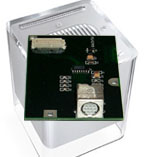
| Griffin Technology has done it again, bringing serial port technology to the newest Apple desktop computers that abandoned that technology in favor of USB beginning with the original iMac in 1998. Griffin introduced the iPort for the iMac, the gPort for the Blue & White Power Mac G3, the g4Port for the Power Mac G4 and now CubePort (or cPort) for the G4 Cube. Griffin's solution is to replace the modem/modem port wit a serial port. Previously, Macs Only! favorably reviewed the iPort and gPort. Griffin supplied an evaluation unit for this review which we installed in our 450 MHz Power Mac G4 Cube.
What You Get
The CubePort comes with an instruction leaflet, a torx wrench and a CD. The leaflet has 2 pages of clear instructions and 6 illustrations. The torx wrench is a handy addition and needed to remove the video graphics and modem cards. An installer for the two extensions (drivers) is contained on the CD.
Installation
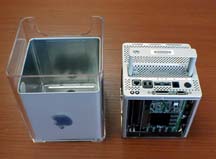
Installing the CubePort in a G4 Cube is simple as outlined in the following images: |
 |
 |
| 1. Turn the Cube upside down, press the handle down until it clicks and pops up and pull the core from the enclosure as shown above. |
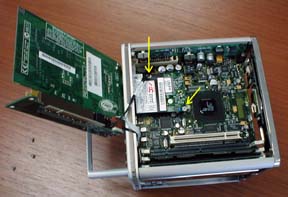 |
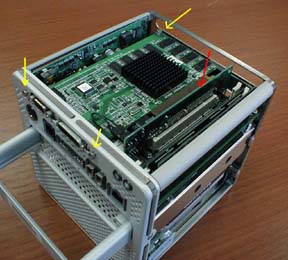
2. Remove the three torx screws (yellow arrows) that hold the ATI graphics/video card. Then gently pull up on the riser card (red arrow) to free the ATI card. |
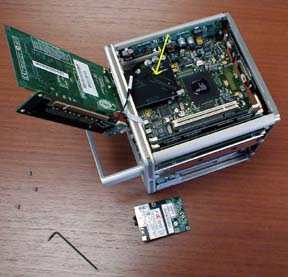
| 3. Lift the ATI card up and lay it to the left as shown at left. No need to remove the wires and cables. Then remove the two torx screws (yellow arrows) holding the modem card and lift it up off the connector and out of the Cube. |
 |
4. Press the CubePort onto the connector and replace the two torx screws. Replace the ATI card and its three screws. Put the Cube's core back into the enclosure and press down the handle until it locks into place. |
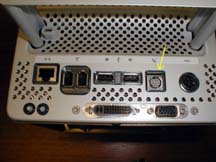 |
| 5. The CubePort's serial port (yellow arrow) in place of the modem port. |
| Finally, insert the CD and click on the installer. That's it.
Use
The CubePort should work with all serial devices that have drivers for Mac OS 9.0.4. I hooked up my Supra modem to test the CubePort after it was installed. The CubePort is used by selecting "CubePort" in the "Connect via" menu and the Supra modem in the "Modem" menu of the Modem control panel. The Supra modem dialed and connected perfectly. In addition, our HP printer printed and our Olympus digital camera transferred images to the G4 Cube.
Summary
The Griffin Technology CubePort works as advertised. It is an excellent addition to the Cube for those with devices that need a legacy serial port. The compatibility of the Griffin Technology 'Port series has been very high. The only issue, of course, is that one loses use of the internal modem and port. |
. . [Go to Macs Only!'s Daily News]
Copyright © 1995, 1996, 1997, 1998, 1999, 2000 by Bill Fox,
All rights reserved.
Macs Only! Logo and page design by Bob Burdeau
MY LAWYER MADE ME POST THIS: 8-/
The Macs Only! web site is for informational purposes only. No one associated with Macs Only! assumes any responsibility for its accuracy. The information is subject to change without notice. Any use of, or actions taken based upon, any of the information contained on this web site is done entirely at your own risk. Mention of any products or services is for informational purposes only, and constitutes neither an endorsement nor a recommendation. Macs Only! and those associated with Macs Only! assume no responsibility with regard to the selection, performance, or use of these products.
Apple, Apple Logos, Macintosh, and Mac OS Logos are registered trademarks of Apple Computer, Inc. All other trademarks mentioned belong to their respective owners.
|