Hands-On: Apple AirPort In A Combo Wired/Wireless Network
December 13, 1999
Price: Base Station $299 list, Card $99 list
Pros: AirPort software installed on computers easily, Setup Assistant worked flawlessly, AirPort works flawlessly, really cool!
Cons: Copying large files or a folder of many small files is much slower than over a wired 10baseT ethernet, Mac users inclined to bypass the Setup Assistant.
Rating: Excellent, 4 out of 5 Exclamation Points: 
On Saturday I set up my AirPort wireless network as an extension to my wired ethernet network. The AirPort portion of the network includes the AirPort Base Station (ABS) and two AirPort cards, one in a Power Mac G4/400 (S) and the other in an iBook. Even with a glitch caused by a loose connection to the ethernet hub, the ABS was set up and running on my home/office network in minutes. That's right minutes and not hours or days. I'm not boasting because I am clearly no super SysAd. I just followed the meager directions explicitly. Forget what you may have read in the Washington Post or on other Mac web sites. The ABS is the best thing ever for local networking.
The Wired Network
First, let me describe my home/office network (see diagram below for the completed network). There are four desktop Mac/clones (Power Mac G4/400(S), Blue & White Power Mac G3/300, PowerBase 180 and Power Mac 7100/80), an Epson 740 printer and two portables, my 2400c and my daughter's soon-to-be-hers iBook. They are all connected via ethernet with two 4/5-port hubs. There is 1.5 MBps Cox Road Runner cable internet service connected via a Motorola cable modem to the built-in ethernet port of the B&W G3 which also has an Apple 10/100 ethernet PCI card ($29 from Small Dog) that connects to a hub and the rest of the network. The B&W G3, therefore, acts as a firewall to the rest of the network and an internet router running IPNetRouter v1.3.3 from Sustainable Softworks (m.c.--I owe Peter Sichel a full review of this fabulous product). In summary, the internet service comes in through the cable modem to the G3 and out through a second ethernet card using IPNetRouter and two hubs to the other computers. The printer is connected to a hub via Infowave's PowerPrint for Networks so all the computers can access it.
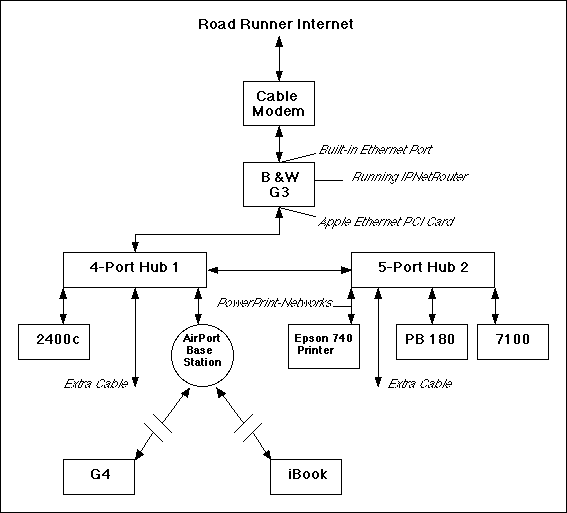
Diagram of the completed combo network. The AirPort Base Station is where the G4 used to be.
My plan was to place the AirPort Base Station on the ethernet network where the Power Mac G4 is currently connected. Then temporarily move the G4 to my basement work room while my home/office ("computer room" according to my long-suffering web widow) is reconverted to a bedroom for some of the relatives that we expect for the holidays. Actually, the ABS will be used primarily for the iBook and eventually the PowerBook 2400c since I expect to reclaim my home/office and reinstall the G4 after the holiday visitors exit.
Setting Up The AirPort Base Station
The G4 was used to setup the ABS. I disconnected the G4 and hooked up the ABS to the network at the same port on hub 1 and to its power supply, then took a deep breath. I had already installed the AirPort card and software on the G4 and the iBook but I had been totally unnerved by the ABS horror stories appearing on other web sites and in newspaper articles. But encouragingly when I opened the AirPort Utility on the G4 the ABS was listed in the AirPort Utility window and the LEDs on the ABS flashed through the cycles as they were supposed to--see this Apple TIL.
I made sure per the instructions that the G4 was set up to access the internet just as if it were connected to the hub instead of the ABS. This is the first critical step because the AirPort Setup Assistant will take those settings and configure the ABS exactly the same and then reconfigure the G4's TCP/IP and AppleTalk control panels to access the ABS. The second critical step is to use the AirPort Setup Assistant. I was tempted to enter the settings manually just like I do with internet settings when installing the Mac OS--I never use the Internet Setup Assistant. I heeded the excellent advice from John Farr on applelinks.com who found out the hard way. I ran the AirPort Setup Assistant from the G4 and answered several obvious questions about the network including providing a name for the AirPort wireless sub-network (I chose AirPortOne). I am now reasonably convinced that anyone who precisely follows these two steps will not have a problem with the ABS connection unless the ABS or their ISP are defective. There are a number of popup menus and check boxes that get checked or not by the Assistant depending on the network that are not intuitive during a manual setup and there's no manual to consult except the manual of trial and error. I repeat John's advice, "Use the AirPort Setup Assistant."
Here are screenshots of the ABS settings made by the Assistant in the three tabs of the AirPort Utility application on the G4:
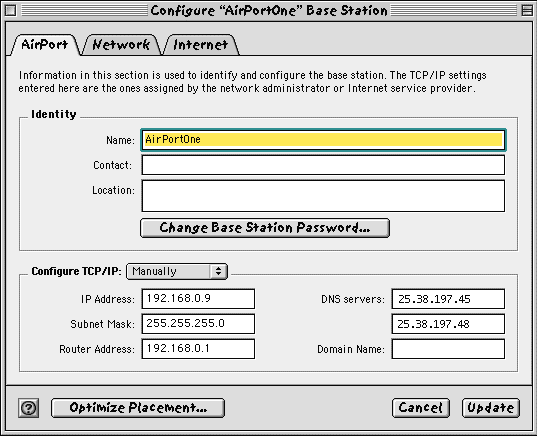
AirPort Tab: Note that the ABS is password protected. The ABS's Router Address is actually the IP address of the B&W G3 under IPNetRouter. The B&W G3 is serving as a software router for the entire network. The ABS's IP Address is the G4's original "slave" address under IPNetRouter. The DNS server addresses are those of Cox's Road Runner service (actually I changed them in the image above).
Note that the "Configure TCP/IP:" popup menu says "Manually" despite my using the Assistant. The second setting is "Using DHCP" which would probably be the right setting for IPNetRouter v1.4+ which has a built-in DHCP server. IPNetRouter v1.3.3 that I am using does not. It is also probably the right setting if I had connected the ABS directly to the cable modem since Road Runner assigns IP addresses using DHCP. The third setting is "Using PPP" which would probably be right for a direct dialup connection. The "Optimize Placement" button goes to a signal strength indicator which allows each computer ("client" in systems lingo) to be moved to get the best signal.
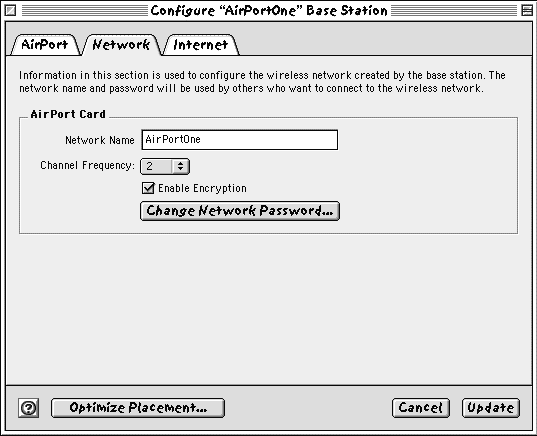
Network Tab: The "Channel Frequency" can be set at one of 14 different channels. "Encryption" should be unchecked if using a non-Apple wireless card that doesn't support Apple's encryption protocol. Note that there is a password for the network as well as for the ABS.
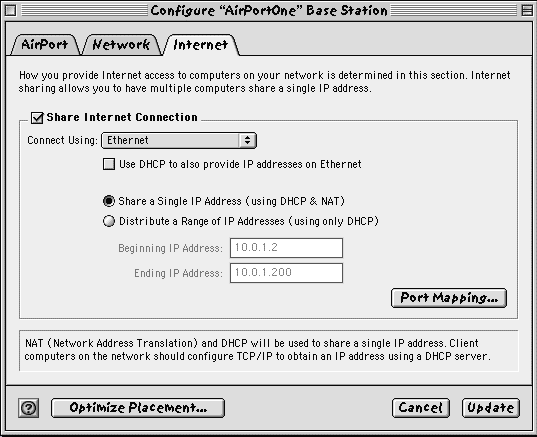
Internet Tab: These are the settings chosen by the Assistant. I am not sure that I would have picked these manually. There are enough combinations on this panel to drive one nuts while desperately trying to get a connection to work. Use the Assistant.
Here is are the settings that the Assistant provided to the G4's TCP/IP control panel when it automatically made a new one and configured it for the AirPort network:
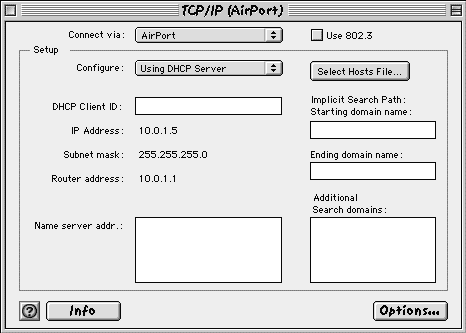
The Assistant made a new TCP/IP configuration called "AirPort" and set "Connect via" to "AirPort" and "Configure" to "Using DHCP Server". The IP Address, Subnet mask and Router address were assigned by the ABS when I made a connection from the G4 to it.
The assistant also set the AppleTalk control panel as:
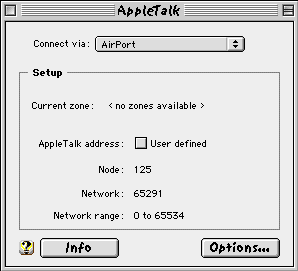
Connecting The G4 To The ABS
Using the AirPort control strip module on the G4's control strip (there's also an alias under the Apple Menu), I turned AirPort on, selected the AirPort network "AirPortOne", entered the password that I had entered during the setup and 4 of 5 of the dots on the control strip turned green after a few seconds, a good sign. After shutting down and rechecking all the connections, I found a loose one at the hub. After restarting everything, all computers (except the iBook not connected yet) and the printer were listed in the G4's Chooser window and launching Netscape loaded Macs Only!'s front page -- sweet success and three cheers for Apple!
Connecting The iBook
After booting up the iBook, AirPort was on so I just selected the network "AirPortOne", entered the password and got 4 of 5 green dots. Launching Netscape loaded my daughter's "Blue Harvest" (a Star Wars 'Zine) front page. That's all there is to it.
Conclusions
I have been using AirPort for many hours now without one disconnect or other glitch. I've played Quake III Arena Demo over the internet (it's getting hard to find a server that doesn't ask for the CD key!) with no perceptible difference in speed. I've copied large files and folders with lots of small files with no freezes. Apple's AirPort wireless networking is terrific with one exception. That exception is copy speed which is a fraction of that of a wired 10baseT network.
It is amazing to me that something this complicated could be set up so easily and that it works so well in Version 1.0. I give Apple and its AirPort development team a standing ovation. The AirPort wireless network is excellent and gets four Macs Only! exclamation points. It would have received 5 if its copy speed were equivalent to a 10baseT wired network.
Copyright © 1999 by Bill Fox
All rights reserved--no use permitted without attribution.
Of course . . .
Saw something? Send a tip or a correction
The archive ran on reader tips. What did you see, where, and do you want the credit? Something wrong on this page? Say so and it gets fixed.