Review of Que! a USB CD R/W Drive

Hands-On Review: Que! A USB CD Read/Write Drive
Guest Review By Frank Proctor
August 23, 1999
QPS, Inc. Price: $299.99 list
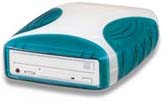
With the growing niche market served up by iMac, laptop, and various desktop computers, the need for USB devices has grown by leaps and bounds. It was only a matter of time before companies stepped up to the plate and released CD-R/W drives to fill this need. One of them, QPS Inc., markets a 2x4x8 USB CD-R/W drive known as the Que! I've owned this product for nearly a week now, and have put it through quite the torture test. I thought the general public would appreciate knowing the results. Let me say up front that not all is glowing about this drive, but it does have many positive features.
Minute 1: I open the box to find a leather carrying case holding the drive, power cable, AC/DC converter block, USB cable, and complimentary CDR/CDRW media. A little shuffling around and I find easy to follow instructions (mac oriented), and the included software disc (Toast, Toast USB extensions, and various MacOS USB updates). The drive is a very easy on the eyes white with bondi blue highlights... and looks so cute next to an iMac that it's almost sickening. *grin* QPS Inc. advertises that the drive will work with minimal fuss on Macintosh systems running OS 8.51 or higher, or PC's with Windows 98. Indeed, this is true. The first time I plugged the drive into the iMac I use at work, I was able to use it to read CDs, install software, and do all of the normal things an SCSI or IDE CD drive could do. On my PC, I had to install a set of drivers first, but that experience was also effortless. Out of the box, this drive works. That's a good sign.
So I spend an entire day getting weeks worth of CD Audio tracks off my hard drive and into the compilations I want. There's nothing to fancy in this endeavor, install the included Toast 3.8 USB, reboot, and drag and drop my way to wonderful mixes. Audio CDs burn like a charm with this drive. It can't play audio, but it can burn it -- an odd twist. QPS notes that this feature will be added in a future software revision by the way.
The next thing I do is make backups of my OS 8.6 system CD's (they're getting scratched to death *sigh* ). Easy as pie, made a disc image in toast, and wrote it to CD. I brought it home, and for the next few days spent time backing up data and seeing how it handled the PC side of things. Even though the included Adaptec EZ CD Creator works fine, CDR Win and other recent CDR apps seem to work just fine -- a MAJOR plus in my book. Amusingly, the drive shows up as a Mitsumi CR4802TE drive under Windows, which is indeed what it is under the bondi-blue styled case. Copied tons of files to CDR's, backed up portions of my hard drive to multiple sessions on a CDRW, and even managed to backup a hideously scratched Windows 98 CD with no problems.
I also tried to test it on a few systems with very minimal memory amounts, and the Que! worked fabulously. The 2MB buffer on the drive took everything I hit it with, and it even let me burn some audio tracks at 4x (though this is NOT recommended).
A few days later, I moved onto one of the more important (for me) needs I have - backing up my Sony Playstation discs. Now, I'm no pirate -- next to many of my actual CDs are CDR backups, waiting for the day when hours of brutal playtime will render it's original cousin useless. I backup anything that can be backed up, it's just how I do things, and the Que! drive has to be able to backup anything I throw at it. Unfortunately, it handled the Playstation discs miserably. The games rip to image files just fine, but ANY attempt to write them via Toast on MacOS, or EZ CD and CDR Win on PC, results in a very quick failure. The Mac side gives a cryptic SCSI bus error and ejects the unburnt disc, while the PC side notes what amounts to "drive not ready," and spits out a partially burned coaster.
Playstation discs are simple Mode 2 CD XA discs... a very very common format nowadays, so I decided to do more research on this. I tried to copy 5 "Enhanced" CDs I own - all failed. I then tried to copy 3 PC games which have data and audio tracks -- all failed. I then attempted the same with two Mac games, and met the same result. The Que! drive simply cannot burn CD XA Mode 2. (And yes, I tried various media, cabling, memory settings, and software).
Disgruntled, I removed the Mitsumi CR4802TE from the USB case and noted that it had an IDE connector and all the usual connectors I'd expect on such a burner. Placing the burner into a spare PC, I decided to test a hunch. Removed from the USB case, the burner backed up two playstation discs, all of the PC/Mac games I attempted, and even let me make a semi-original Enhanced CD of my own. Of course, this moots the point of a USB device (by reverting it back to IDE), and voids the warranty -- so everyone out there in net land is highly advised NOT to do this. I repeat, DON'T TAKE APART THE DRIVE!
What this shows is that the Que! drive works great for Audio OR data CDs, but is useless for combination Data/Audio CDs (Mode 2 anyone?). I hope this is something they will fix with a software update, but if the feature list on their web site is any indication, they won't be. This baffles me however, in that nothing about USB seems to inherently preclude CD XA recording, and the drive itself does CD XA fine when used as an IDE drive. (I've emailed QPS about this, and will gladly report back with their response).
| Update: While I still can't write a CD XA disc from a disc image, I did manage to get Adaptec's CD Copier Deluxe for PC to do a disc to disc copy of a CD XA disc. This leaves hope that QPS can release some sort of firmware or software update for those of us who deal with a lot of Mode 2 media. -Frank |
For the rugged individuals out there, this drive does seem to be able to withstand shock somewhat, as a few test kicks and drops didn't seem to harm the drive at all. However, since the Que! is just an Internal IDE CDRW in a plastic case, I suggest you don't try this at home. At most, it just means the cute case won't be getting shattered so easily.
So there you have it, caveat emptor. A flashy USB CDR that installs like a charm, goes anywhere, withstands wear and tear, and writes audio or data perfectly - just not in combination.
Copyright © 1999 by Bill Fox
All rights reserved--no use permitted without attribution.
Of course . . .
Saw something? Send a tip or a correction
The archive ran on reader tips. What did you see, where, and do you want the credit? Something wrong on this page? Say so and it gets fixed.