Hands-On Review of PowerLogix 1.2 GHz G4 Upgrade
|
Hands-On Review:
1.2 GHz PowerForce G4 Series 100 By Bill Fox PowerLogix. Price: $619 ($594 from OWC with CubeOwner.com discount) Features: Very fast, user installable, no software enablers, reasonably priced, did we say very fast? Fixits: None. Our Cube's initial wake from deep sleep issue was fixed by updating Mac OS X to 10.2.4 (2/13/03). PowerLogix kicked off the current round of faster (800 MHz to 1 GHz) G4 CPU upgrades late last summer with the introduction of the PowerForce G4 Series 100 for Power Mac G4s with a 100 MHz system bus. PowerLogix also has dual CPU G4 upgrades and a Series 133 for Power Mac G4s with a 133 MHz system bus, single and dual. On Friday, PowerLogix began shipping faster single and double 1.2 GHz models for Power Mac G4s. We got a single 1.2 GHz model for our customized G4 Cube. It replaces a PowerLogix 800 MHz upgrade that we bought last fall.
What You Get. In the box is the G4 CPU module, an 80x80x15 mm super-quiet Panaflo fan, a Rev.A DVD disc with installation instructions and a printed installation instruction sheet for those who do not have an extra DVD player sitting around. The CPU card comes with a special polished aluminum heat transfer plate already attached. The notch cut in one corner of the heat transfer plate is cut deeper than the notch on the unpolished plate that came on our PowerLogix 800 MHz G4 upgrade last October. The notch is also rounded. This is important because some people had problems with the Cube's handle/latch binding in the original design. We did not have this problem with any of the upgrades that we have installed but the deeper rounded notch should certainly alleviate the problem. Installation. We have become adept at this so it took us less than 20 minutes to switch the CPUs. Someone doing this for the first time should take their time and view the DVD and read the printed instructions carefully before starting. Then, it is important to follow the instructions exactly, step by step. It took us just over an hour to do so for our first installation but it worked and we had no problems. Prying the original CPU's heat plate up off the finned aluminum heat sink the first time takes a bit of force. We used a small screwdriver in the tiny slot in the center of the edge where the two come together to pry the CPU up and off. The trickiest thing was correctly and fully plugging the fan's tiny connector into the voltage regulator module (DC-DC board). It needs to click in solidly for the fan to work. We used fine needle-nose pliers for this. Also a bit tricky is plugging in the two ribbon cables (ATA and AirPort) on the underside of the motherboard. One has to be careful when unplugging and replugging them and make sure they are fully seated. We believe that PowerLogix has done such a good job with the documentation that anyone who is reasonably handy and comfortable working on electronic devices can install a new CPU in their Cube. However, anyone who has a hesitation should get a technician to do it for an hour or less labor charge. Speed Tests. So how fast is it? We performed an extended set of tests to give everyone a good idea of what to expect from the fastest, and best-looking, single-processor Mac on the planet. Each test was performed three times with a reboot between them and the average time or score is reported below. All applications and windows were closed and networking was turned off during the tests. We compared the times or scores of the same Cube with the 800 MHz upgrade that our new 1.2 GHz CPU replaced. The Cube runs on Mac OS X 10.2.3. A similar comparison between the 800 and our original 450 MHz G4 CPU in the very same upgraded Cube was posted here last October. First we measured the times for startup and shutdown. Startup time was measured from the chime to a completed desktop with login set to automatic. Shutdown was measured from pressing the shutdown button on the dialog box to, well, shutdown. While doing this can be rarer these days when running Mac OS X, one must still reboot when installing some software. Some people still shutdown their computer when not using it rather than sleeping it. Taking a long time can be annoying.
The startup time, already pretty fast in Mac OS X 10.2.3, was nicely shaved by 10 seconds or 17 per cent. Next we ran some readily available benchmarking applications. Anyone can download these applications and run them on their computer for comparison. However, some people do not like standardized benchmarks for whatever reason so we also ran some so-called real world tests. But first the benchmarks:
Altivec Fractal 1.1.3 measures the speed of the G4's altivec or "velocity" floating point calculation engine. This is one of the main features of the G4 that gives it an advantage over higher clock speed (MHz) Pentium CPUs when processing images. As expected, the 1.2 GHz G4 is 50 per cent faster than the the 800 MHz G4. Let1kWindowsBloom 1.0 measures the time it takes to open and close 1000 windows in the Finder. It was one of the first benchmarks available for Mac OS X but for some reason it is no longer listed in VersionTracker's database. The 1.2 provides a substantial 21 per cent improvement over the 800. Skidmarks GT 3.0 is made by Apple and is a part of the Mac OS X Developer Tools. It confirms that the CPU is working at it's rated speed in relation to a 1 GHz G4 CPU. The 1.2 scored 120's and the 800 scored 80's as expected. Xbench 1.0 may become the public benchmark standard for Mac OS X similar to MacBench for the classic Mac OS 9.x and earlier. It has gone through several beta iterations and the results from v1.0, for the most part, have become reasonable consistent between runs. The 1.2's CPU and Threading scores are 52 per cent and 48 per cent faster than those of the 800, mirroring roughly the 50 per cent difference in CPU clock speed. We are very pleased to see the significant improvement in graphics scores for Quartz, OpenGL and User Interface (Finder) of 30, 48 and 49 per cent respectively. Despite the Quartz Extreme graphics implemented in Jaguar (Mac OS X 10.2) and despite the speed of the graphics card, the speed of the CPU in Mac OS X still makes a significant difference in graphics speed. There is also a small improvement in the memory and hard disk scores. Now to the so-called "real world" speed tests. This includes launching applications, copying files, scrolling in documents, encoding MP3 files in iTunes 3.0.1, exporting a QuickTime movie in iMovie 3.0.1, and measuring the frame rate in 3D games. These are really just benchmarks but some people find them more satisfying since they more closely replicate actual actions that they perform on their computer.
Launcing Classic Mode is getting to be really fast. The 1.2 shaved off another 15 percent. It wasn't too long ago that it took over a minute to launch. Most other applications launch in a few seconds. Copying files was the same speed with the 800 and 1.2, whether it is one large file or a folder of many files. Scrolling the Virtual PC 4.0 Manual PDF with loads of images in Acrobat Reader is 17 per cent faster with the 1.2 but it's still not very fast by Classic Mac OS standards. Encoding an MP3 from a CD with iTunes 3.0.1 tested out slightly faster on average with the 1.2 but there was enough variation to be unable to conclude that the speeds are really different. We encoded a 10:23 passage of Beethoven's Sixth for the test. It's possible that the Cube's older and relatively slow DVD/CD ROM drive is the bottleneck. Exporting a movie clip from iMovie 3.0.1 to a QuickTime movie at Full Quality DV was 10 per cent faster with the 1.2. We used the six tutorial movie clips joined together without transitions for the test. We were surprised that such a CPU-intensive test wasn't much faster with the 1.2. 3D game speed is important to a lot of people including us. The two 3D games that we play most frequently on line are Quake III Arena v1.32 and Return to Castle Wolfenstein v1.32. Fortunately, both have demo sequences that can be run to test a configuration's speed or frames per second. The 1.2 provides a healthy boost in framerate for both games, 25 percent for both Quake3A and RtCW. Heat/Noise. Those with Cubes are worried about excessive heat production by upgrades since they are cooled by passive convection. PowerLogix provides a fan that attaches to a ready-made bracket in the bottom of the Cube to combat any buildup of heat. In our review of the 800 MHz PowerForce 100 G4 in our Cube with a GeForce3 graphics card, we showed that it ran cooler than with the stock 450 MHz G4 CPU and stock Rage 128 Pro graphics card because of the fan. This time we measured the heat of the effluent from the main vent and the rear vent over the graphics card with two Radio Shack thermometer probes. We did the measurement at the end of a half hour of playing Return to Castle Wolfenstein on line.
The temperatures are not very different between the 1.2 and 800. The 1.2 measures slightly higher but much lower than the stock Cube. There appears to be no additional worry about excessive heat from the faster 1.2 GHz G4 CPU. Cube owners also enjoy silent computing so PowerLogix has provided one of the quietest 80x80x15 fans available, a Panasonic Panaflo. It can barely be heard in a quiet room unless one looks down over the top and can't be hear at all with a modicum of normal office noise. It is as quiet as an LCD iMac if not quieter. Sleep (revised 2/13/03). Initially, our Cube with the 1.2 GHz G4 upgrade running Mac OS X 10.2.3 would not wake if put into deep sleep. The fans came on and hard drive spun up but there was no USB or video. Fortunately, this appears to be an issue with Mac OS X 10.2.3 because when we updated to Mac OS X 10.2.4, the issue disappeared. Our Cube now wakes from deep sleep just fine, every time. We like to sleep our computers with Mac OS X and not shut them down so we are glad that the wake from deep sleep issue is now fixed. In summary, the 1.2 GHz PowerLogix PowerForce Series 100 G4 CPU upgrade makes our Cube very fast. It's cool to have the fastest single CPU Mac on the planet, even if for just a little while. It's especially nice that that Mac is a customized black G4 Cube. We still think the G4 Cube is the best ever desktop computer. ### ADDENDUM (2/12/03) People wrote us asking about the specifications of the G4 CPUs and how they stacked up speedwise. Below are the specs as shown by Xbench 1.0 and the speed scores. However, the Cubes, other than the one with the 800 MHz and 1.2 GHz CPUs, are not identically configured. The stock 450 MHz Cube, the 800 MHz and 1.2 GHz have 1 GB of RAM but the 1 GHz has 896 MB RAM, still very similar. The stock Cube has an ATI Rage 128 Pro graphics card, the 800 and 1.2 have a GeForce3 and the 1 GHz has a GeForce2 MX. The hard drives in the stock 450 and 1 GHz are the stock 20 GB 5400 RPM Maxtors while the 800 and 1.2 had a fast 80 GB 7200 RPM Seagate Barracuda IV. Here are the specs on the G4's in the stock 450 MHz Cube and in the PowerLogix PowerForce G4 Series 100 upgrades according to Xbench:
*Obviously wrong. Here are the Xbench 1.0 speed test results:
Again, one can see the great effect that CPU clock speed has on the graphics scores. The 1 GHz Cube with the slower GeForce2 MX graphics card scored much better on graphics than the 800 MHz Cube with the much faster GeForce3 graphics card. Learn the secrets of Mac OS X! |
Click On Images Above!
Saw something? Send a tip or a correctionThe archive ran on reader tips. What did you see, where, and do you want the credit? Something wrong on this page? Say so and it gets fixed. |
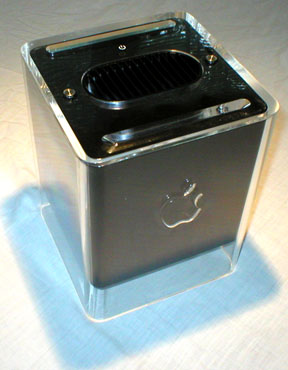 Our black G4 Cube has an OEM NVIDIA GeForce3 graphics card, 1 GB of CL2 RAM and a fast 80 GB, 7200 RPM Seagate Barracuda IV hard drive. With its new PowerLogix 1.2 GHz G4 upgrade it is THE fastest single-processor Mac on the planet--we like that! To see just how fast it is, we ran an extended set of speed tests on it.