Review: Mac Picasso 340 2D NuBus Graphics Accelerator
Review: 340
340
2D NuBus Graphics Accelerator
Company: Village Tronic
North American Distributor:The Software Hut
Price: $339.95
Pros: Performance is very good for a NuBus card and software is outstanding
Cons: Manual a bit thin
Performance Rating: Very good, a 4 out of 5
Village Tronic's Mac Picasso 340 (MP340) is a modular 2D graphics accelerator board for NuBus Power Macintoshes (6100, 7100 and 8100's) and the counterpart to the Mac Picasso 540 (MP540) for PCI PowerMacs previously reviewed on Macs Only!. Village Tronic's North American distributor, The Software Hut , provided the Mac Picasso 340 for this review. The review was revised 4/2/98 based on further testing with updated drivers -- sharper images were obtained for MPEG movies in QuickTime MoviePlayer, equal to those produced by the 7100/80's built-in video.
Mac Picasso 340
The MP340 (photo at right), like each of Village Tronic's boards, looks
well-laid out and 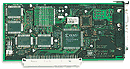 well-constructed. It
has both a VGA port and an Apple monitor port which is very convenient so
that one does not have to use an adapter with a non-Apple multiscan monitor.
The MP 340 uses the same 200 MHz RAMDAC and 100MHz processor graphics accelerator
chip as the MP540. It likewise comes with 4 MB of 100MHz SGRAM.
well-constructed. It
has both a VGA port and an Apple monitor port which is very convenient so
that one does not have to use an adapter with a non-Apple multiscan monitor.
The MP 340 uses the same 200 MHz RAMDAC and 100MHz processor graphics accelerator
chip as the MP540. It likewise comes with 4 MB of 100MHz SGRAM. 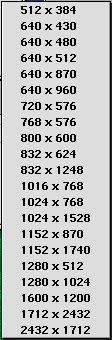 The MP 340 supports visible resolutions from 512x384
to 1152x870 with millions of colors and up to 1600x1200 with thousands.
It also supports "screen doubler" resolutions up to 2432x1712
(1152x870 visible) with 256 colors. See the incredible list of resolutions
available in the screen shot shown at left. By comparison, the three resolutions
available on my PowerMac 7100/80's built-in video are 640x480, 800x600 and
1078x768 and millions of colors only to 800x600. The MP340's box says the
horizontal refresh rates are 15.5-94kHz while vertical refresh rates are
25-160 Hz, all depending on the resolution/monitor being run.
The MP 340 supports visible resolutions from 512x384
to 1152x870 with millions of colors and up to 1600x1200 with thousands.
It also supports "screen doubler" resolutions up to 2432x1712
(1152x870 visible) with 256 colors. See the incredible list of resolutions
available in the screen shot shown at left. By comparison, the three resolutions
available on my PowerMac 7100/80's built-in video are 640x480, 800x600 and
1078x768 and millions of colors only to 800x600. The MP340's box says the
horizontal refresh rates are 15.5-94kHz while vertical refresh rates are
25-160 Hz, all depending on the resolution/monitor being run.
The MP340 like the 540 is modular. It supports the Village Tronic Pablo video-out module (purchased separately) which attaches to the MP340 yielding either PAL and NTSC TV output simultaneously with monitor output. The attachment provides video out through the VGA port so as to not use another NuBus slot or port. However, there is no separate s-video port as with the MP540. Unfortunately, there is no 3D Overdrive module for the MP340. The MP340 supports Quickdraw 2D, QuickTime v2.5 and higher and the MPEG movie compression format.
The MP340 arrived in a small, colorful 7x9x2-inch box. The board itself was tightly packed with foam inserts so the card was well-protected. A 68-page manual was included. It is a bit on the skimpy side but still usable and a work in progress according to the company. The copy I received was v1.0 and some information in it conflicted with that printed on the obviously newer box. Version 2.5 of the software, including Monitors & Picasso control panel v1.5.2, is same as with the MP 540 and came on a diskette.
Test Computer
I used the MP340 in a Power Macintosh 7100/80 with the following characteristics:
- Power Macintosh 7100/80
- 80 MHz PowerPC 601 CPU
- 256K L2 Cache card
- 56 MB 70ns RAM
- 700 MB Apple (Quantum) SCSI internal hard drive
- Mac OS 8.1
- Virtual Memory on at 1 MB
- 1024K disk cache
- Standard Apple graphics on a PDS riser board, 2 MB VRAM, Apple port
- 15" Panasonic PanaSynch monitor with a resolution up to 1280x1024@60Hz and a VGA connector
Installation
The MP340 was installed in a PowerMac 7100/80. All one has to do is open the computer's case, snap out the NuBus slot cover in the rear of the computer and press the board into the NuBus slot on the motherboard. The MP340 was easily pressed directly and smoothly into the slot with no rocking motion. There are no screws to mess with as there are with PCI cards. The monitor , a 15" non-Apple multi-synch, was connected to the VGA port on the Mac Picasso 340.
The monitor control software called "Monitors & Picasso" (M&P) and several system extensions come on a diskette with the MP 340. I received version 2.5 of the software package and v1.5.2 of M&P--same with the MP540. The diskette contained an installer in English and one in German plus "Read Me" files in both languages. Click the Installer and that's it, very simple.
Configuration
The Monitors & Picasso software for controlling the monitor output is marvelous. I covered it in detail in the MP540 review so I won't repeat it here since its operation with the MP340 is identical. However, I do highly recommend reading about it. Here's a screen shot of M&P with many of its features visible.
After setting the resolution, vertical refresh rate, gamma correction and possibly a few other options on M&P, there is nothing else to configure to use the MP 340.
Use
The main feature of the MP340 is the large number of resolutions and monitors that are supported. The resolutions are noted above.
Still: I opened the Lace.jpg sample photo in Adobe PhotoDeluxe v1.1. It is a 396K file, the largest that I could find among the samples. Rotating the photo 90 degrees took 6 seconds for both the MP340 and the built-in video. (This compares with under a second for the MP540 on the 9600/ G3 250). There may be some fractional difference between the MP 340 and the built-in video but it would be 10% or less.
Motion: MPEG -- Village Tronic supplied several MPEG sample movies with the previously-reviewed 3D Overdrive. I used one that shows the MP540 card as the camera rotates all around it and does fly-overs, fly-bys and swoop-ins for about a minute showing off every nook and cranny of the card. It is a 16.5 MB MPEG-formatted file animated at 30 frames per second.
Here are the results, in average frames per second, for the PowerMac 7100/80's built-in video and MP340 using two different window sizes, the default size and the largest possible:
| Window Size (pixels) | Built-In Video (fps) | Mac Picasso 340 (fps) |
|---|---|---|
384x288 |
2.5 |
4 |
580x420 |
1.5 |
2.5 |
While the MP340 was faster, fairly slow frame rates were produced by both the built-in video the MP 340. Both produced reasonably sharp images at the smaller window size and at the larger window size when High Resolution was selected in QuickTime's MoviePlayer.
Motion: .mov -- My daughter has several "Star Wars" spoof QuickTime movies, one is a parody of the TV show "Cops" and the other a parody of the movie "Fargo." Both .mov files are animated at 12 fps and both played the movie clips at 12 fps.
Myth: I played the 3D game "Myth: The Fallen Lords" on both video boards. Neither take advantage of Myth's 3Dfx capabilities and both yielded good, sharp images and equally good background resolution.
Conclusions
The Mac Picasso 340 is a very good high/multiple resolution 2D graphics accelerator, beating the built-in video of an 8100/80AV in scrolling speed tests performed by Village Tronic. With regard to resolutions and monitor support, it greatly out performs the Power Macintosh 7100/80's built-in video. If one wants to work with video-out, the Pablo module is available to attach to the MP340 with out the need for another card or another NuBus slot. In the PhotoDeluxe, MPEG and .mov trials, largely processor and QuickTime dependent, the MP340 and the built-in video are pretty evenly matched with the nod going to the MP340. If one needs the increased graphics acceleration or resolutions or monitor support or video-out in a NuBus Mac, then at $339.95 the MP 340 can do the job very well. However, the PowerPC 601/80 MHz CPU is pretty slow for this stuff. Soon NewerTECH and Sonnet Technologies will have a G3 CPU card for the NuBus PowerMacs, costing from $600-900 and increasing the computer's speed by 6-8 times. The G3 CPU cards will use the PDS slot occupied by the existing video board in many of the NuBus PowerMacs. NewerTECH's info states that the built-in video board will be moved to a slot in the CPU card. Depending on how the implementation affects the video card or the NuBus slots, one may want to look at the Mac Picasso 340 as an alternative solution. If one has a 7100/80 or better NuBus Power and doesn't need it for the resolutions, then the MP340 is still a very good second video board for multiple monitors or for a replacement to an existing video card gone bad. While not tested, I'd expect the MP340 to perform better than the built-in video on 6100's and 7100/66's.
Copyright © 1998 by Bill
Fox.
All rights reserved--no commercial use permitted without attribution.
Of course . . . . . . and I am proud to be an Evangelista!
. . .
Saw something? Send a tip or a correction
The archive ran on reader tips. What did you see, where, and do you want the credit? Something wrong on this page? Say so and it gets fixed.